Hybrid k3s · Part 5
Hybrid k3s #5: Putting kubectl down — GitOps 1/3
0. About this series
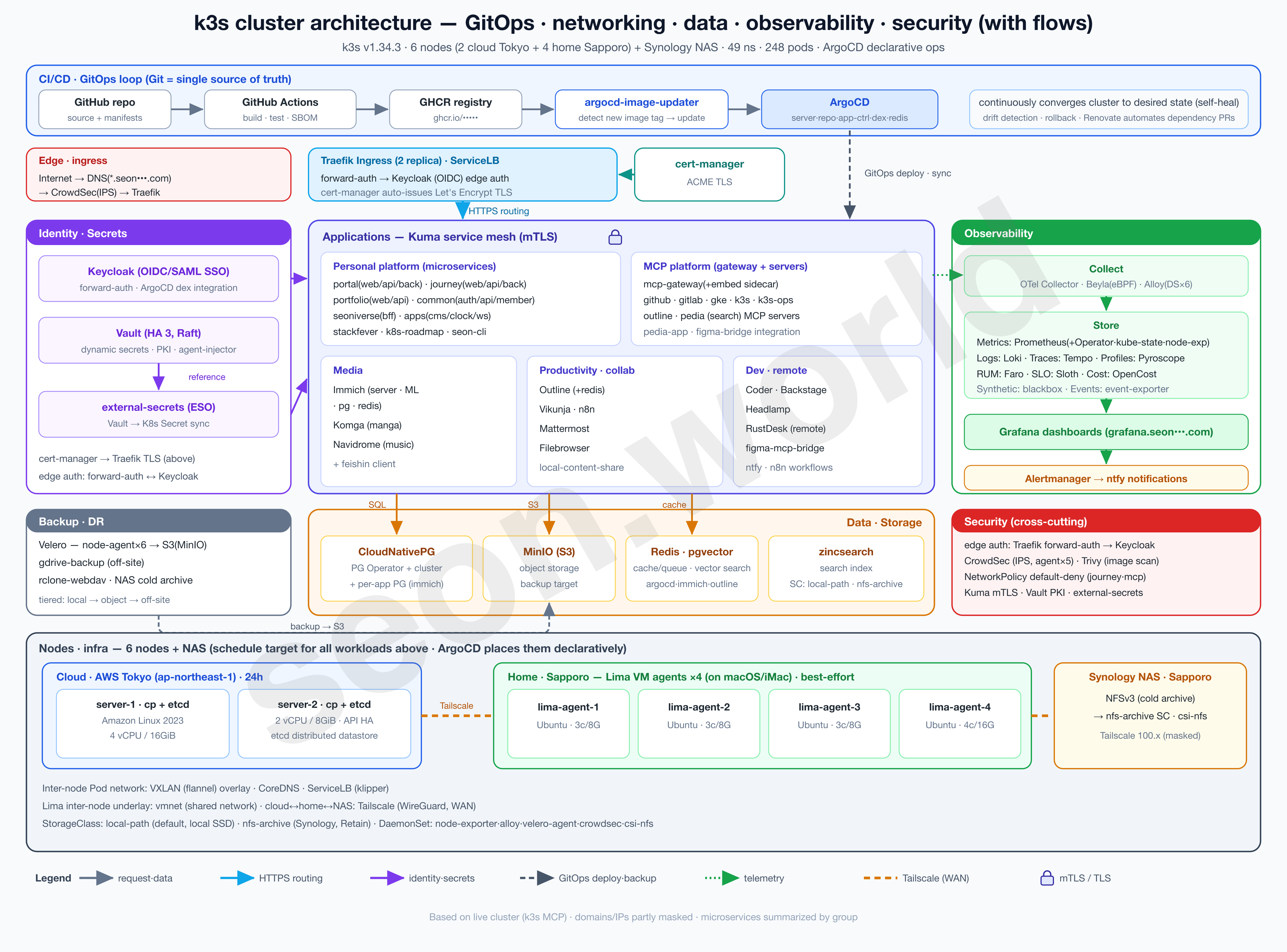
This series is a record — written one piece at a time — of how I built the homelab in the image above, the one that’s still running as I write this.
What started as a toy project from a simple “would this even work?” turned, through satisfying performance and an endless cycle of tearing down and rebuilding, into a real toy that takes the edge off the stress that builds up at work. It isn’t a resource-rich cluster, but it’s been more than enough to get a real taste of Kubernetes, and it keeps handing me the next thing I want to try.
- 6 nodes — 2 Lightsail servers (control plane + etcd) in the cloud (AWS Tokyo) + 4 Lima VM agents on a home (Sapporo) iMac
- 19 vCPU / 61 GiB total, 49 namespaces, 248 pods (150 running)
- Deployed with ArgoCD, auth via Keycloak OIDC, with CloudNativePG, Vault, CrowdSec, Prometheus/Grafana and more running on top
Through part 4, I stood up the cluster and the CloudNativePG on it imperatively (
helm,kubectl apply). This part is about turning all of that into GitOps with ArgoCD. The scope — from tool choice to cluster bootstrap to secret management — is too wide for one part, so I’ll split it into three.
- Part 5 (this one) · Design — why GitOps, and what to use (tool and structure), decided by comparison.
- Part 6 · Bootstrap — install ArgoCD and stand up the cluster’s skeleton with app-of-apps and ApplicationSet.
- Part 7 · Apply — move CloudNativePG over to GitOps as the first target, and finish off secret (password) management.
This first part takes us as far as deciding the tool and the structure.
1. Background — the things I’d stood up imperatively started to pile up
When I brought up CloudNativePG in part 4, two kinds of commands were enough. I installed the operator with helm, and brought up the database cluster with kubectl apply.
# Part 4 — install the operator
helm upgrade --install cnpg cnpg/cloudnative-pg \
  --namespace cnpg-system --create-namespace --wait

# Part 4 — apply demo-db.yaml (Cluster CRD)
kubectl apply -f demo-db.yaml
Kubernetes broadly distinguishes three ways of managing objects — imperative commands (kubectl create ...), imperative object configuration, and declarative object configuration (kubectl apply -f) (Kubernetes — Object Management).
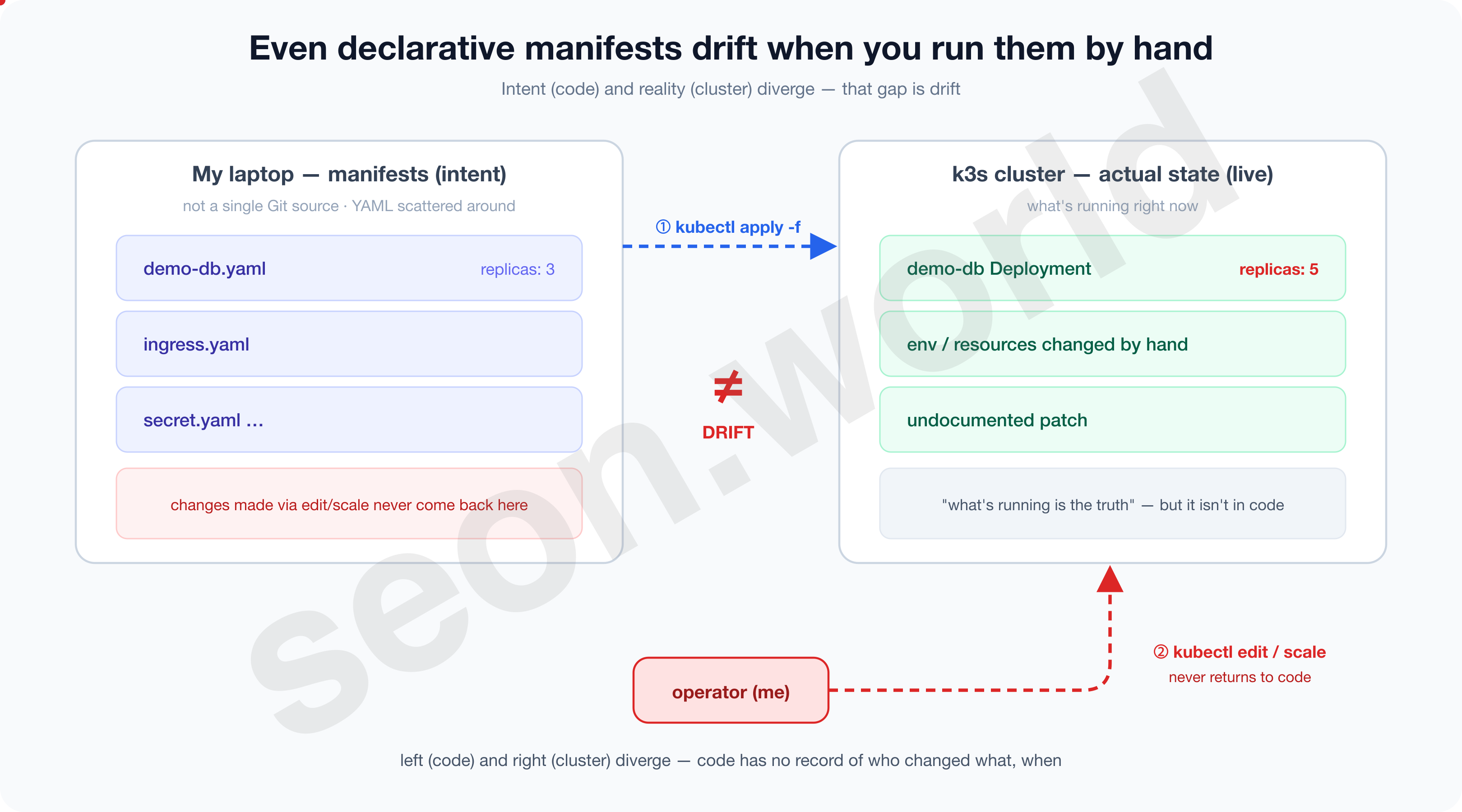
The problem was where that YAML lived, and who applied it, and when. In my case the file was somewhere on my laptop, the person applying it was me, and the timing was “whenever it crossed my mind.”
This is operating declarative manifests by hand, and as the things I was bringing up grew one by one, I soon hit a wall.
1-1. The walls I hit operating by hand
An app soon sits on top of the DB, an ingress in front of it, secrets and backups beside it. And as I ran more and more services, this cluster has grown to 248 pods across 49 namespaces. Running that scale by hand with apply, I ran into the following walls.
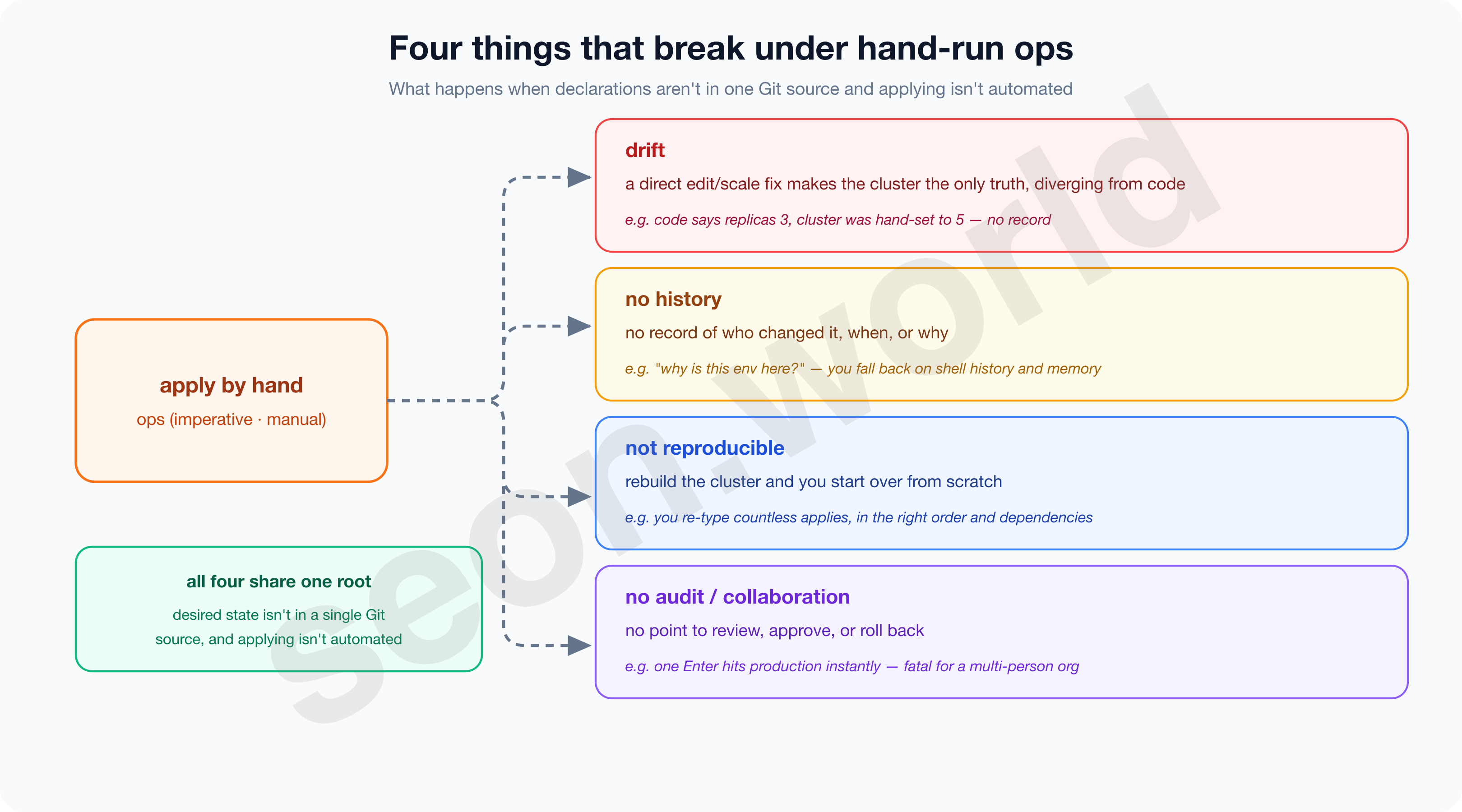
- Drift — the cluster becomes the only truth.
- The moment you fix the cluster directly with
kubectl editorkubectl scalein a pinch, the original YAML and the actual state diverge. That change isn’t recorded in any file, so re-applying the original later silently overwrites it or conflicts. - Kubernetes itself works by having controllers continuously reconcile the current state toward the desired state (Kubernetes — Controllers), but if that “desired state” lives only in my head and in scattered files, there’s no reference point for reconciliation at all.
- “What’s running now is the real thing” — but that real thing isn’t in code.
- The moment you fix the cluster directly with
- No history — you can’t answer “why is it like this?”
- Why is
replicas3, who added this env var, when, and why — manual ops keeps no record of it. You’re left leaning on shell history and memory.
- Why is
- Not reproducible — you can’t rebuild the cluster.
- Tear down a node or build a new cluster, and you have to re-type all those
applys again, in the right order and with the right dependencies. Thinking back to parts 1 and 2, where I tore down and rebuilt the cluster over and over, this wasn’t somebody else’s problem.
- Tear down a node or build a new cluster, and you have to re-type all those
- No audit or collaboration — there’s no point to stop and review.
- There’s no review of a change, no approval, no revert. Hit Enter and it goes straight to production.
- Honestly, for a homelab I use alone, this item hurts the least. But the real point of running this homelab is to get hands-on with a way of working that transfers directly to a work environment — an enterprise cluster operated by many people.
- The moment a team touches the same cluster, ‘who / when / why’ and review, approval, and rollback stop being optional and become essential.
- A single change can lead straight to an outage, and without a record to trace it, neither recovery nor accountability is possible.
- GitOps structurally removes this problem by making every change go through Git.
- GitLab explains that a merge commit into the main (trunk) branch itself becomes the audit trail, and the Merge/Pull Request becomes the place where review, approval, and collaboration happen (GitLab — What is GitOps).
- This aligns with one of CNCF OpenGitOps’ core principles, “Versioned and Immutable” (a versioned, immutable history of state) (OpenGitOps Principles).
The biggest cause of these walls wasn’t whether manifests existed — it was whether those manifests were gathered in one place as the single source of truth, and applied continuously and automatically.
Even declarative manifests bring drift, missing history, no reproducibility, and no audit when applied by hand. The point is to gather declarations in one Git place and continuously automate how they’re applied — and especially in an enterprise where many people touch the same cluster, audit and collaboration become essential.
2. GitOps
2-1. What GitOps is
GitOps, in one line, is “an operating model where you declare the desired state in Git, and keep the cluster always matching that declaration.”
- First, declare the desired state of the system (infrastructure and apps) with Git as the single source of truth.
- Second, a software agent inside the cluster automatically pulls that declaration and converges the actual state to it.
- Humans only write “this is how it should be” into Git; reflecting and keeping it in the cluster is the agent’s job.
Simply “putting YAML in Git” is not GitOps in itself.
The point is to nail Git down as the single source of truth, so that the cluster cannot change without going through Git. If the path of typing kubectl by hand stays open alongside it, Git is just a file store.
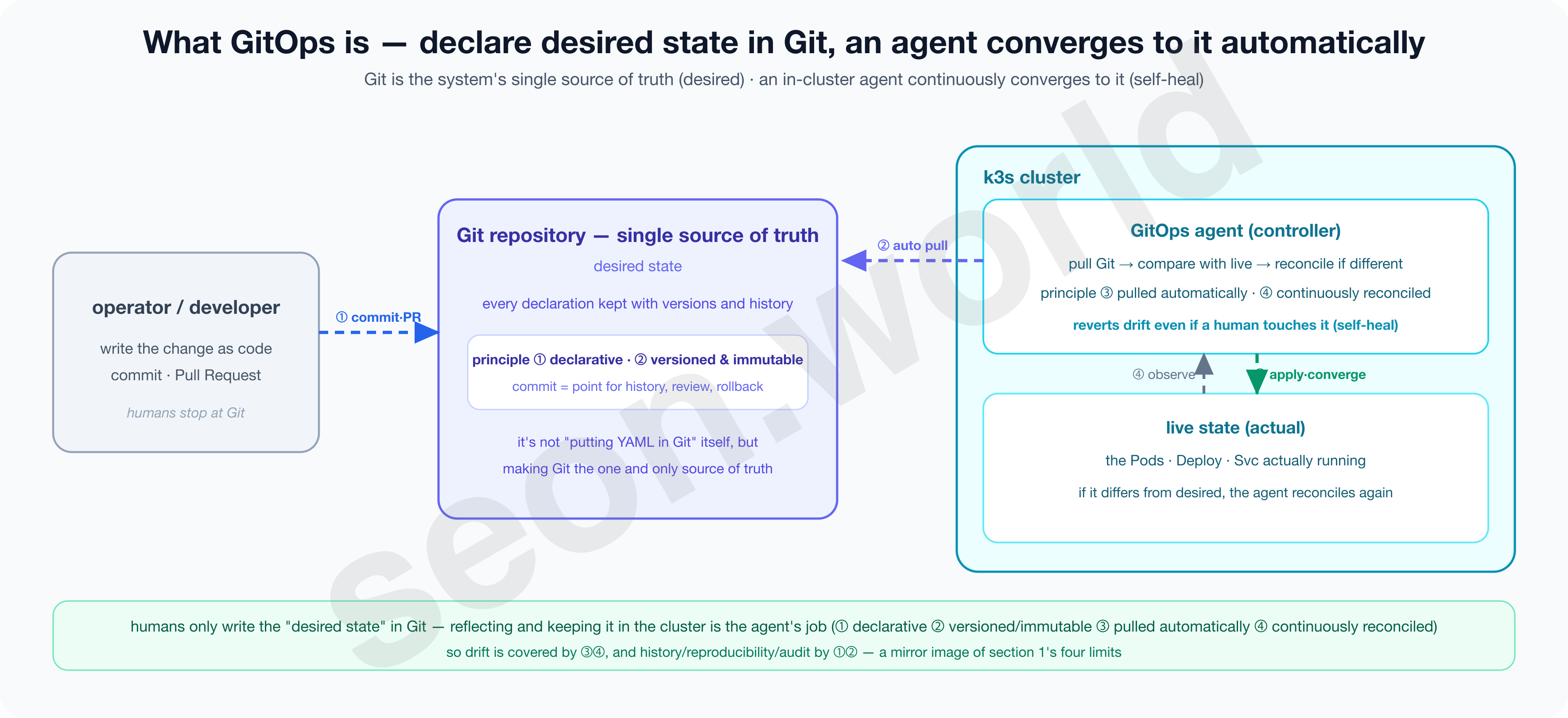
This approach was first named by Weaveworks’ Alexis Richardson in a 2017 piece called Operations by Pull Request, and today the CNCF’s OpenGitOps project standardizes and maintains its definition with four principles (OpenGitOps).
- ① Declarative
- Write the desired state not as “do this” (a command) but as “it should be this way” (a declaration).
- Commands depend on order and timing; a declaration converges to the same result whenever it’s applied.
- ② Versioned and Immutable
- Keep that declaration somewhere, like Git, where versions remain and nothing can be changed arbitrarily.
- Every change is set in stone as a commit, leaving who, when, and why, and a revert becomes a rollback.
- ③ Pulled Automatically
- Rather than a human pushing it in, the agent pulls the declaration itself.
- ④ Continuously Reconciled
- The agent constantly observes the actual state and, when it diverges from the declaration, brings it back in line.
2-2. Why GitOps
- Drift → corrected by ③ auto-pull + ④ continuous reconciliation.
- The agent constantly compares Git against the actual state, so even if someone diverges it by hand with
kubectl edit, the next reconciliation reverts it (self-heal). - “What’s running now is the truth” gives way to “Git is the truth.”
- The agent constantly compares Git against the actual state, so even if someone diverges it by hand with
- No history or audit → solved by ② versioning.
- Every change remains as a commit or Pull Request, so who, when, and why is traceable, and there are points for review, approval, and rollback.
- Especially important in an enterprise where several people touch the same cluster.
- Not reproducible → solved by ① declaration + ② a single source.
- The desired state of the entire cluster is declared in one place in Git, so even rebuilding the cluster restores the same shape by re-applying that declaration.
In short, the value of GitOps isn’t “because it’s convenient” — it’s that it structurally removes the problems that manual ops structurally carried. And that value splits once more on safety, depending on who performs ③ and ④ and in which direction.
2-3. Push delivery and Pull delivery
There are two ways to deliver a change to the actual cluster.
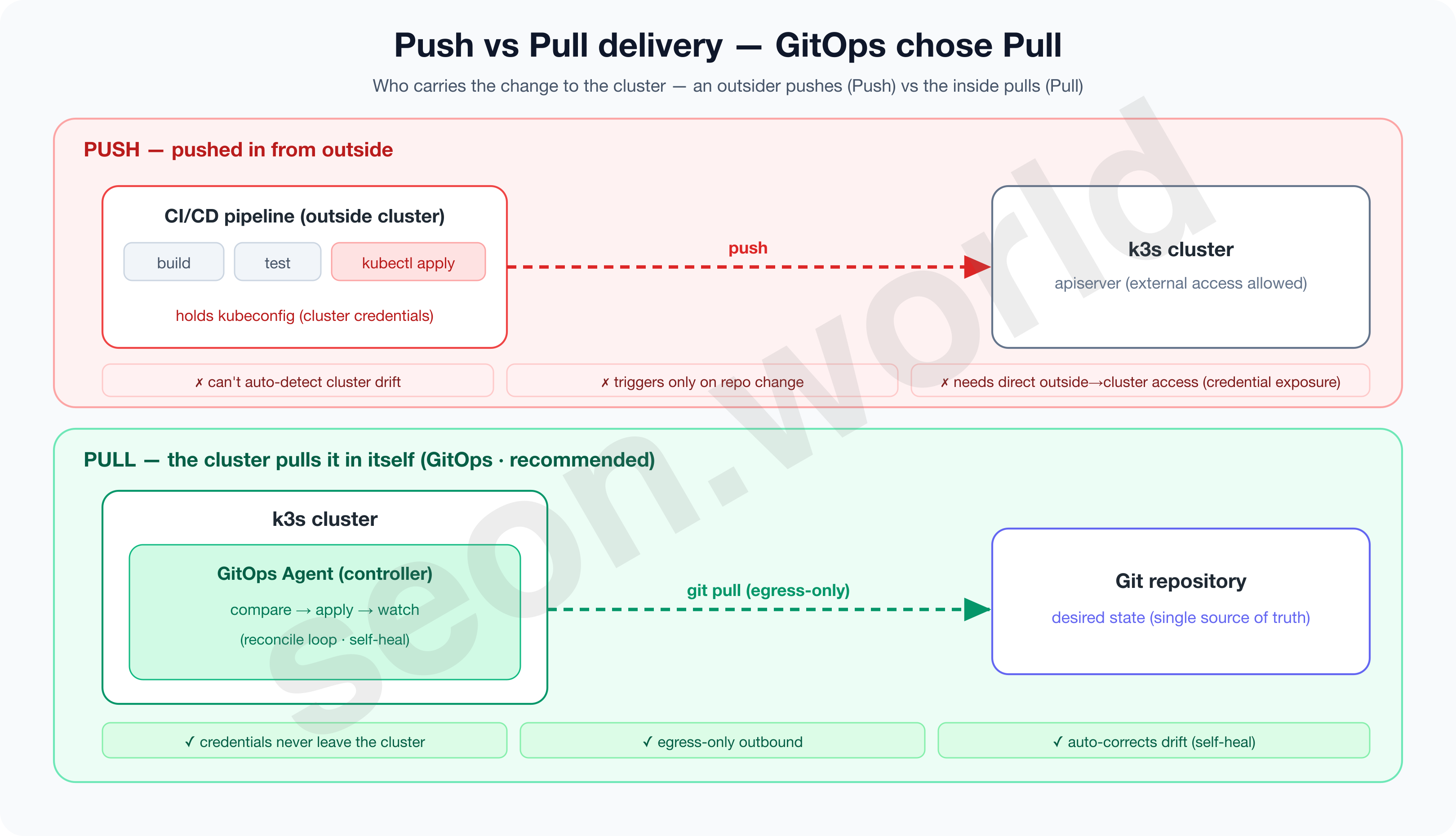
Push delivery is where a CI/CD pipeline outside the cluster pushes the change into the cluster. The pipeline builds and then applies the manifests, and gitops.tech points out the limitation that this approach “is only triggered when the environment repository changes, and (the cluster’s) deviation isn’t noticed on its own” (gitops.tech).
Pull delivery is where an agent (operator) inside the cluster watches Git directly and pulls the change in. As gitops.tech describes it, the operator “continuously compares the desired state in the environment repository with the actual deployed state, and aligns the infrastructure if there’s a difference.” That this compare-and-correct never stops is the decisive difference from Push.
2-4. Why Pull is safer and more robust
There are two clear reasons Pull is held up as the recommended GitOps approach.
First, security — credentials never leave the cluster.
- Push requires an external CI to hold privileged credentials to connect to the cluster.
- Pull, by contrast, has the deploying party inside the cluster, so “the external service doesn’t need to know the credentials” (gitops.tech), and the connection uses only outbound (egress) from the cluster.
- CNCF also, in a 2025 piece, summarizes the pull model’s security benefit as “not exposing the cluster to external push traffic” (CNCF, 2025).
Second, self-heal — it reverts deviation on its own.
- The Pull agent keeps comparing the actual state against Git, so even drift someone introduced directly with
kubectl editis reverted at the next reconciliation. - The drift that “a human had to revert” in section 1 is now reverted by the controller.
3. What to do GitOps with — ArgoCD vs Flux vs Fleet
In section 2 I explained what GitOps is (declare the desired state in Git → an agent converges to it automatically), why it fills the four limits of manual ops, and why the Pull approach is safer and recommended.
Now I need to research the tool that will actually run that Pull.
There are several Kubernetes GitOps tools, but the three I picked as serious candidates for real-world comparison are — ArgoCD, Flux CD, and Rancher Fleet.
All three share the same essence — “make Git the single source and match the cluster to that declaration” — but their character clearly splits on how they structure controllers, how they divide CRDs, whether they embed a UI, and how many clusters they have in mind.
Let me go through each one’s concept and architecture.
3-1. ArgoCD — an app-centric GitOps controller
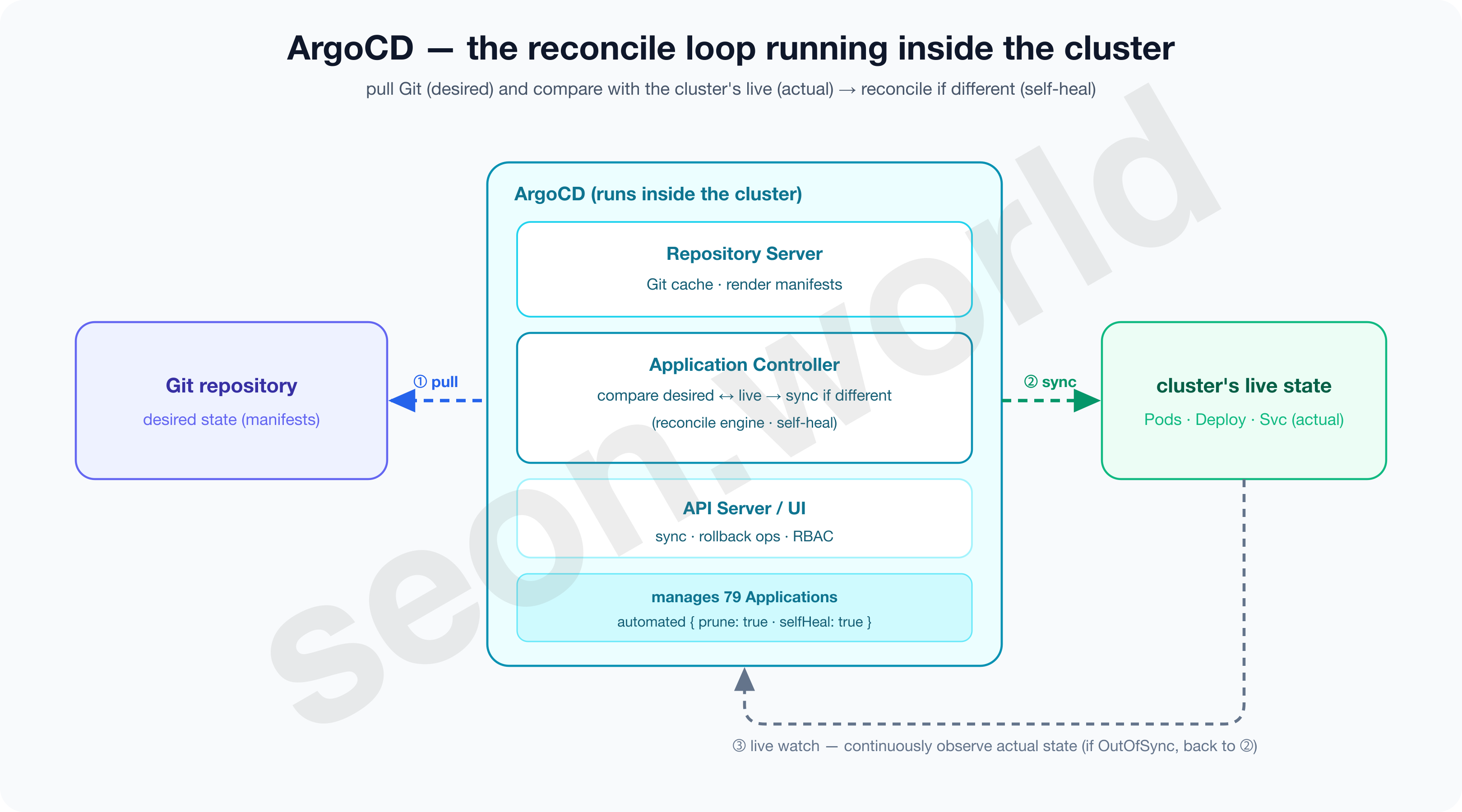
ArgoCD is part of the Argo project that Intuit built and donated, and the official docs define it as “a declarative GitOps continuous delivery tool for Kubernetes” (Argo CD Docs). The application-controller that handles reconcile (matching the current “actual” state to the “desired” state), the repo-server that caches and renders Git, and the server that provides the API and UI all work as one suite.
Below is ArgoCD’s detailed architecture drawn against the latest stable version (v3.4.3 — the same version my cluster runs). On top of the API, Repo, and Application three cores come ApplicationSet, Redis, and Dex; the Repository Server pulls and renders Git, and the Application Controller compares it against live and syncs to the cluster.
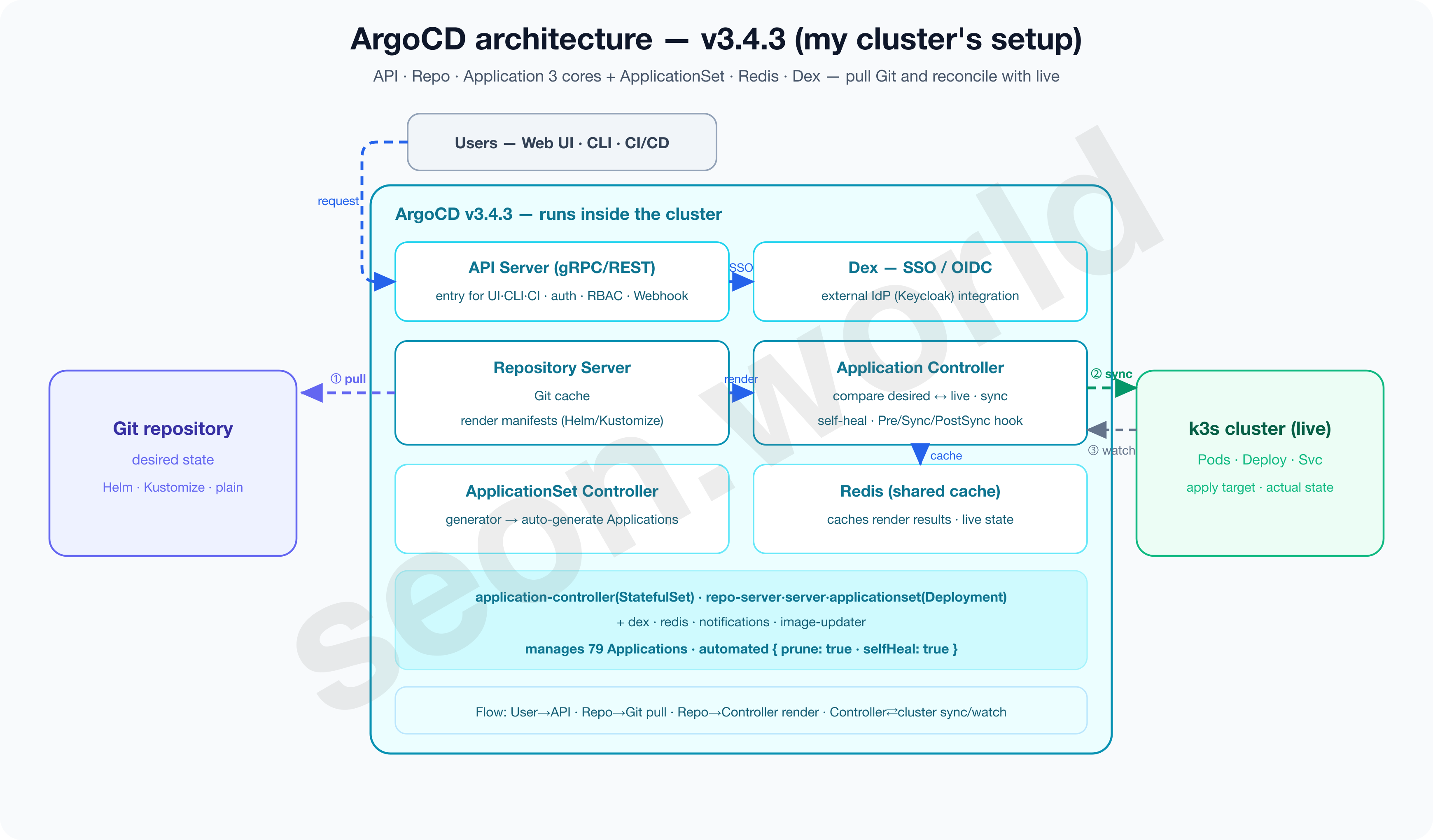
ArgoCD has two distinctive traits.
- Everything is grouped into “apps” centered on a CRD called
Application.- You declare “sync this Git path to this namespace of this cluster” in a single
Application, and scale up with the app-of-apps pattern, where one app owns many, or with ApplicationSet, which auto-generates apps from a template.
- You declare “sync this Git path to this namespace of this cluster” in a single
- It ships with a rich Web UI built in.
- The official docs cite “a Web UI that shows application activity in real time” as a core feature, and you handle sync status, diff, and rollback, plus SSO (OIDC) and RBAC, right from the screen (Argo CD Docs). Its maturity is solid too. Argo entered CNCF incubation in 2020 and reached Graduated on December 6, 2022 (CNCF — Argo Graduated).
3-2. Flux CD — a composable GitOps toolkit
Flux was originally built by Weaveworks, and in v2 it was rewritten on top of the Kubernetes controller-runtime and its own GitOps Toolkit. The official site introduces Flux as “a set of continuous and progressive delivery solutions for Kubernetes that are open and extensible” (Flux).
That word “set” captures Flux’s character well.
If ArgoCD is one suite of controllers, Flux is a combination of several controllers split by purpose.
Below is Flux’s detailed architecture per the latest version (v2.8) official docs.
Six controllers each own their CRDs; the source-controller pulls sources and exposes them as artifacts, the kustomize/helm controllers apply them via SSA, and the image controllers commit new images back to Git, closing the loop.
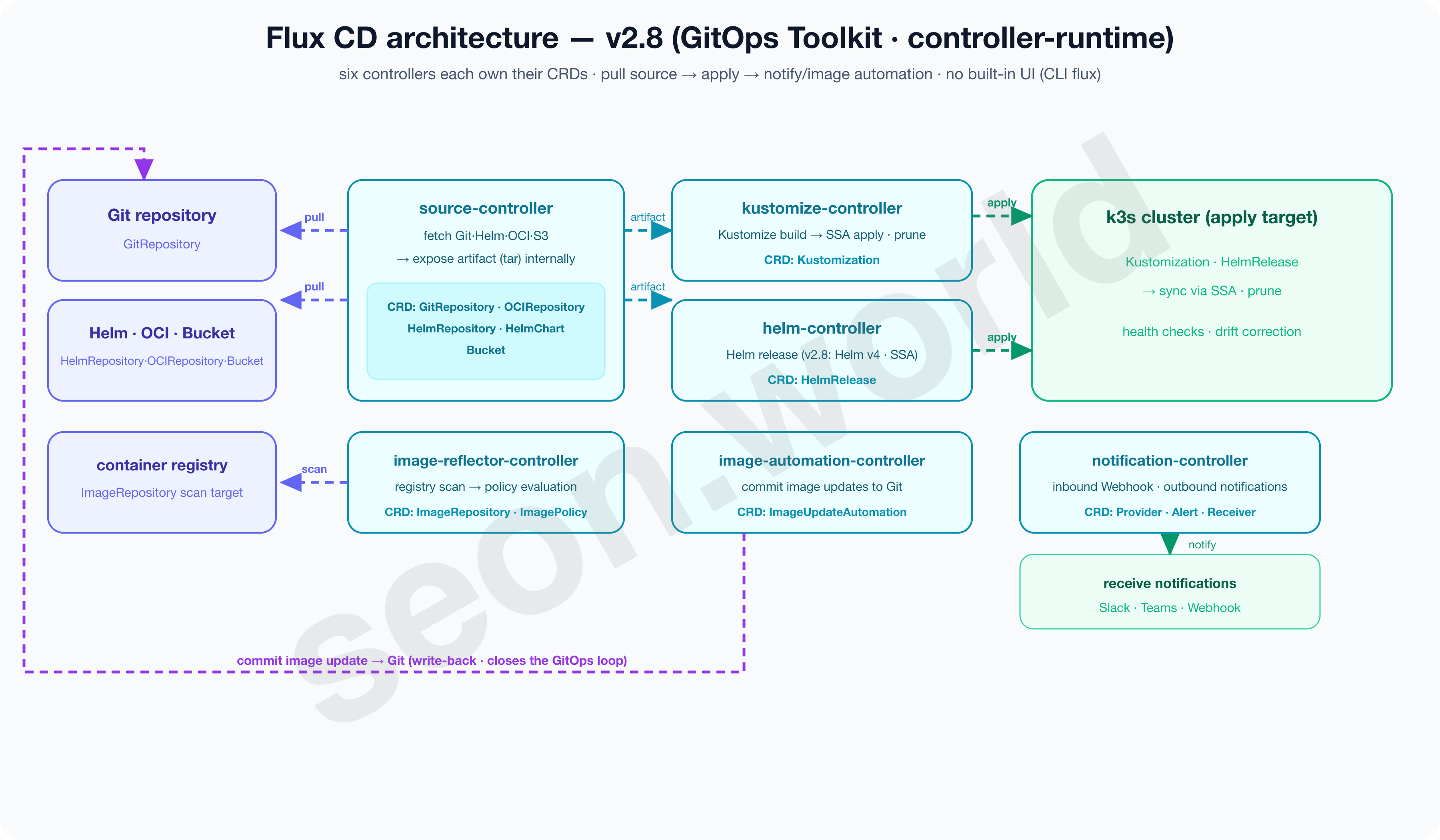
Concretely, source-controller (acquiring sources: Git, Helm, OCI, S3, etc.), kustomize-controller (applying Kustomize), helm-controller (Helm releases), notification-controller (notifications), and the image automation controllers each own their own CRDs (GitRepository, Kustomization, HelmRelease, etc.) and collaborate (Flux).
This finely divided structure has the upside of free composition and extension and a light cluster footprint, while differing in that there’s no officially built-in Web UI.
You mostly check status with the CLI (flux), and if you need a screen you attach a separate ecosystem UI or a vendor-hosted product (Flux).
Its maturity is neck and neck with ArgoCD. Flux also reached CNCF Graduated on November 30, 2022 (CNCF — Flux Graduated), so the two tools graduated less than a week apart, with maturity that stands shoulder to shoulder.
3-3. Rancher Fleet — GitOps for hundreds of clusters
The third is SUSE’s Rancher Fleet. Its starting point differs from the other two.
If ArgoCD and Flux start from “GitOps for one cluster” and expand toward multi-cluster, Fleet is designed from the start to aim at “large-scale multi-cluster.”
AWS’s guidance docs also introduce Fleet as a “GitOps-at-scale” tool “built to scale from a single cluster to thousands” (AWS — Rancher Fleet).
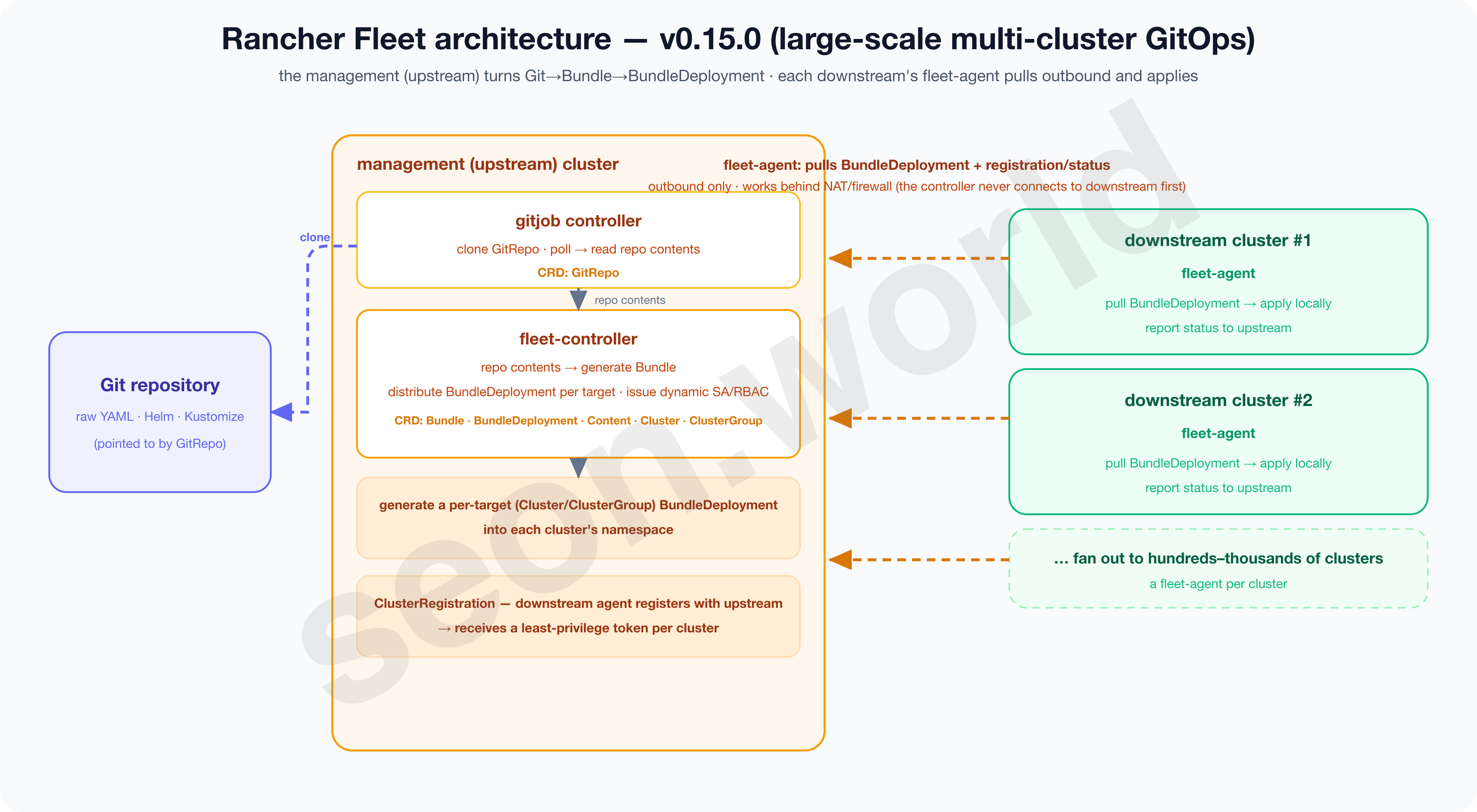
Its operating model is tuned to that purpose. The Fleet Manager on the management (upstream) cluster packages the contents of a repo pointed to by GitRepo into a Bundle, then fans out to many downstream clusters according to group and target settings (Fleet — Mapping to Downstream Clusters).
You usually manage it all from Rancher’s Continuous Delivery screen. It’s a powerful model for an MSP or a large enterprise where clusters are scattered by the dozens or hundreds across data centers, regions, and customers.
That said, unlike ArgoCD and Flux, you should also note that Fleet is not a CNCF project but part of the SUSE Rancher ecosystem.
Below is Fleet’s detailed architecture per the latest version (v0.15.0) official docs.
The upstream gitjob and fleet-controller turn Git into a Bundle and create per-target BundleDeployments, and each downstream’s fleet-agent pulls them outbound and applies them (the controller never connects to downstream first, so it works behind NAT and firewalls).
3-4. Comparison in one table
Lining the three up on the same axes makes the differences clear.
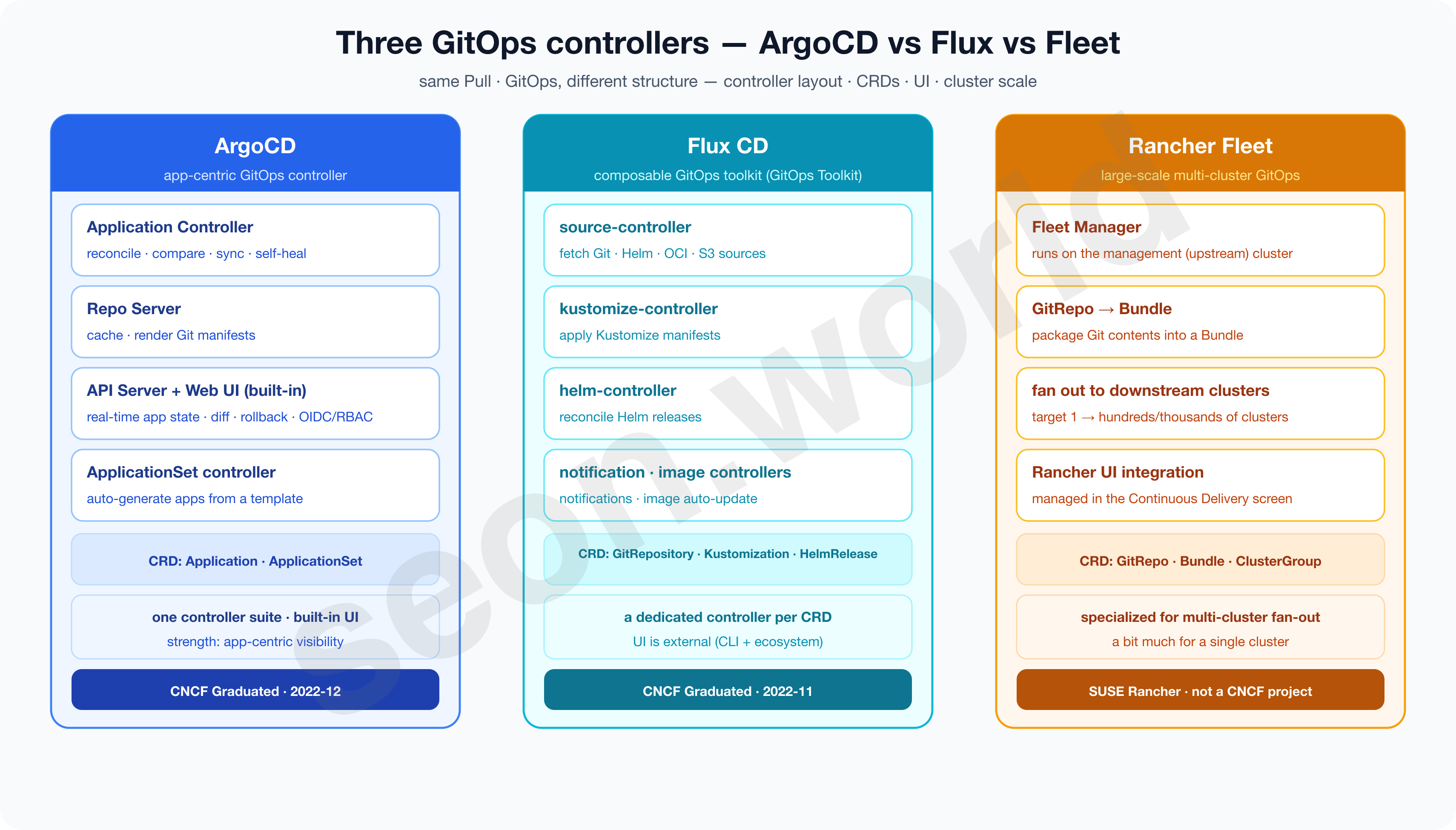
| Aspect | ArgoCD | Flux CD | Rancher Fleet |
|---|---|---|---|
| One-line definition | app-centric GitOps controller | composable GitOps toolkit | large-scale multi-cluster GitOps |
| Controller layout | one suite (controller · repo · server) | per-purpose controllers (GitOps Toolkit) | Fleet Manager → downstream |
| Core CRDs | Application · ApplicationSet | GitRepository · Kustomization · HelmRelease | GitRepo · Bundle |
| Web UI | built-in (status · diff · rollback · OIDC/RBAC) | none official (CLI + ecosystem UI) | Rancher UI integration |
| Target scale | single~multi cluster | single~multi cluster | hundreds~thousands of clusters |
| Governance | CNCF Graduated (2022-12) | CNCF Graduated (2022-11) | SUSE Rancher (non-CNCF) |
| Strength | app-level visibility · UI | lightweight · composability | large-scale cluster fan-out |
On maturity (both CNCF Graduated) and on core behavior like Pull and self-heal, ArgoCD and Flux are effectively on par. The real fork was “do you work with apps through a screen (ArgoCD) vs compose controllers and work through the CLI (Flux)”, and for Fleet, “how many clusters do you have.”
3-5. So why ArgoCD?
My choice was ArgoCD. But this wasn’t a question of “which of the three is superior” — it was a decision driven by my homelab’s context.
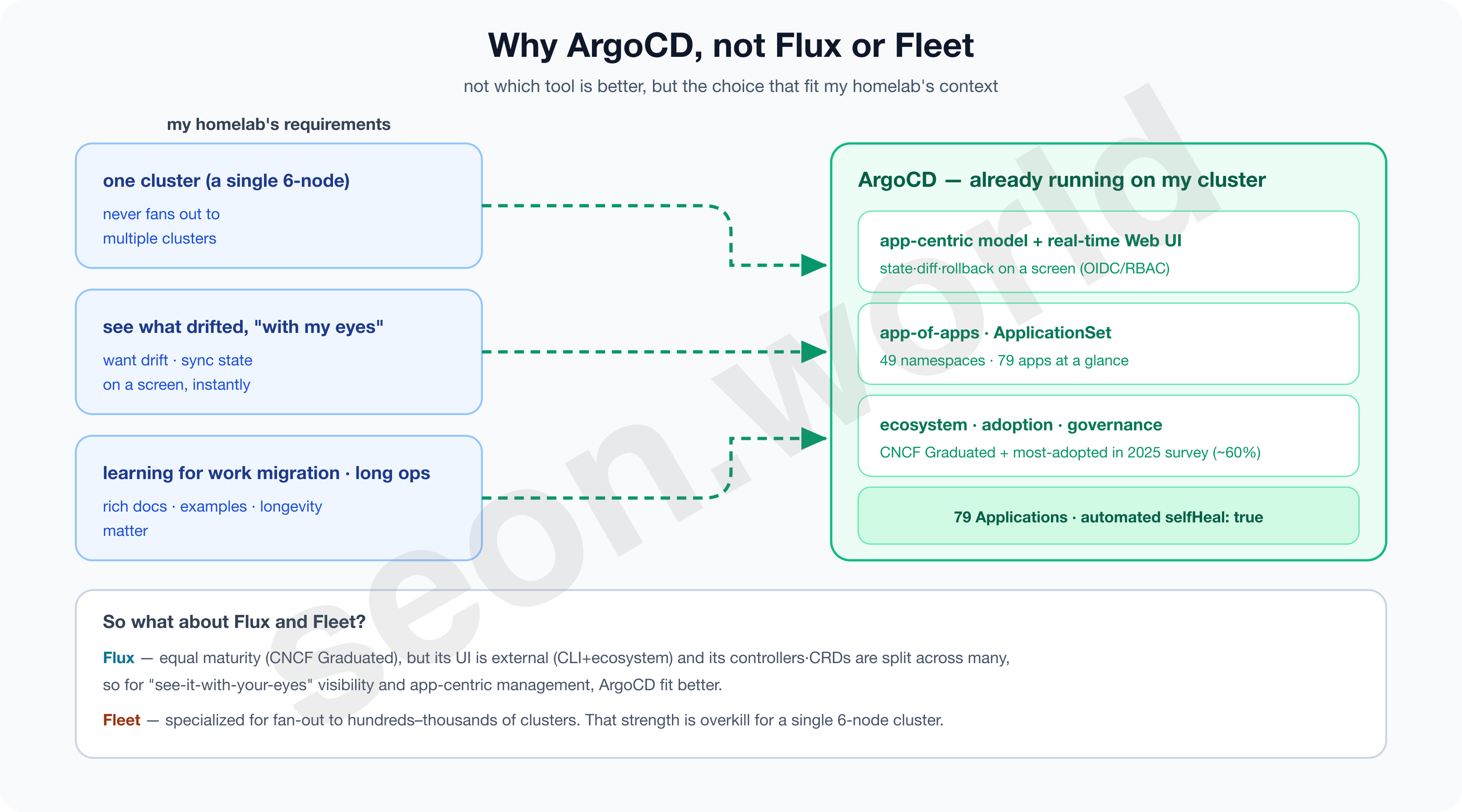
There were three criteria.
- First, my environment has one cluster (6 nodes, but a single cluster).
- Fleet’s strength of fanning out to hundreds of clusters has no use for me; if anything, that management model is overkill.
- Second, I had a strong desire to “see with my own eyes what had diverged.”
- ArgoCD’s built-in UI, where you can instantly check drift and sync status, diff and rollback on a screen, was more intuitive than CLI-centric Flux, both for learning and for operating.
- Third, since the point of this homelab is to learn a way of working I can someday move to an enterprise, I needed a tool with rich material and examples and a guaranteed lifespan.
- It was also a tool I’d grown familiar with from using it on projects, and one I wanted to dig into more deeply.
- ArgoCD is CNCF Graduated, and in CNCF’s 2025 ArgoCD end-user survey, adoption was overwhelming — about 60% of respondents’ clusters deploy applications with ArgoCD (CNCF, 2025).
Flux is an excellent tool too. With equal maturity (CNCF Graduated), lighter and freely composable, it may actually suit a team that wants to automate ops in a CLI- and code-centric way even better. I personally prefer operating via CLI over a UI as well, but for my conditions — “I want to work with apps through a screen, and I’m practicing an enterprise move by running a single cluster for the long haul” — ArgoCD simply fit a notch better. Right now, ArgoCD runs on this cluster reconciling 79 apps.
$ kubectl get statefulset,deploy -n argocd
NAME                                             READY
statefulset.apps/argocd-application-controller    1/1     # reconcile engine (pull/compare/sync)
deployment.apps/argocd-repo-server                1/1     # Git manifest cache/render
deployment.apps/argocd-server                     1/1     # API / UI
deployment.apps/argocd-applicationset-controller  1/1     # the auto-generator covered in a later part
# … dex / redis / notifications / image-updater

$ kubectl get applications -n argocd --no-headers | wc -l
79
And you can confirm that selfHeal is enabled for this reconcile too.
$ kubectl get application root -n argocd -o jsonpath='{.spec.syncPolicy.automated}'
{"prune":true,"selfHeal":true}
4. What structure to build ArgoCD with — rendering, organization, repository, access
Deciding on ArgoCD doesn’t mean I can put part 4’s CloudNativePG into Git right away. Following the flow of GitOps —
what and how do I write into Git → how does ArgoCD pull it → and apply it to the cluster — points to decide on appear one after another along that path. Summarized, there are four.
- In what format do I write the manifests — rendering
- How do I register and manage those apps in ArgoCD — organization
- Where (in what repository structure) do I keep those files — repository
- How does ArgoCD access that repository — access (auth)
Only once these four are decided does the ‘structure’ to move CNPG into GitOps stand up. From here, axis by axis, let me look at what it is, why it must be decided, what the candidates are, and on what basis to choose.
4-1. Manifest rendering — Kustomize vs Helm vs plain
First, let me clarify what “manifest rendering” is.
To bring anything up in Kubernetes, you ultimately need YAML (a manifest) describing the target — a Deployment, a Service, a ConfigMap.
But even for the same app, replicas and image tags differ per environment (dev/prod), and similar apps multiply into many copies. At this point, “how you keep the source written, and how you produce the final YAML that actually goes into the cluster” — this process is what we call rendering.
ArgoCD doesn’t force this rendering into one way; it looks at the files in the repo path and decides automatically.
If there’s a kustomization.yaml it’s Kustomize, if there’s a Chart.yaml it’s Helm, and if neither, it’s plain YAML (plain) (Argo CD Docs). So what we decide is “which of these three to write my manifests in.” Let me look at how the three differ for the same goal (the same app at replicas 1 in dev, 3 in prod).
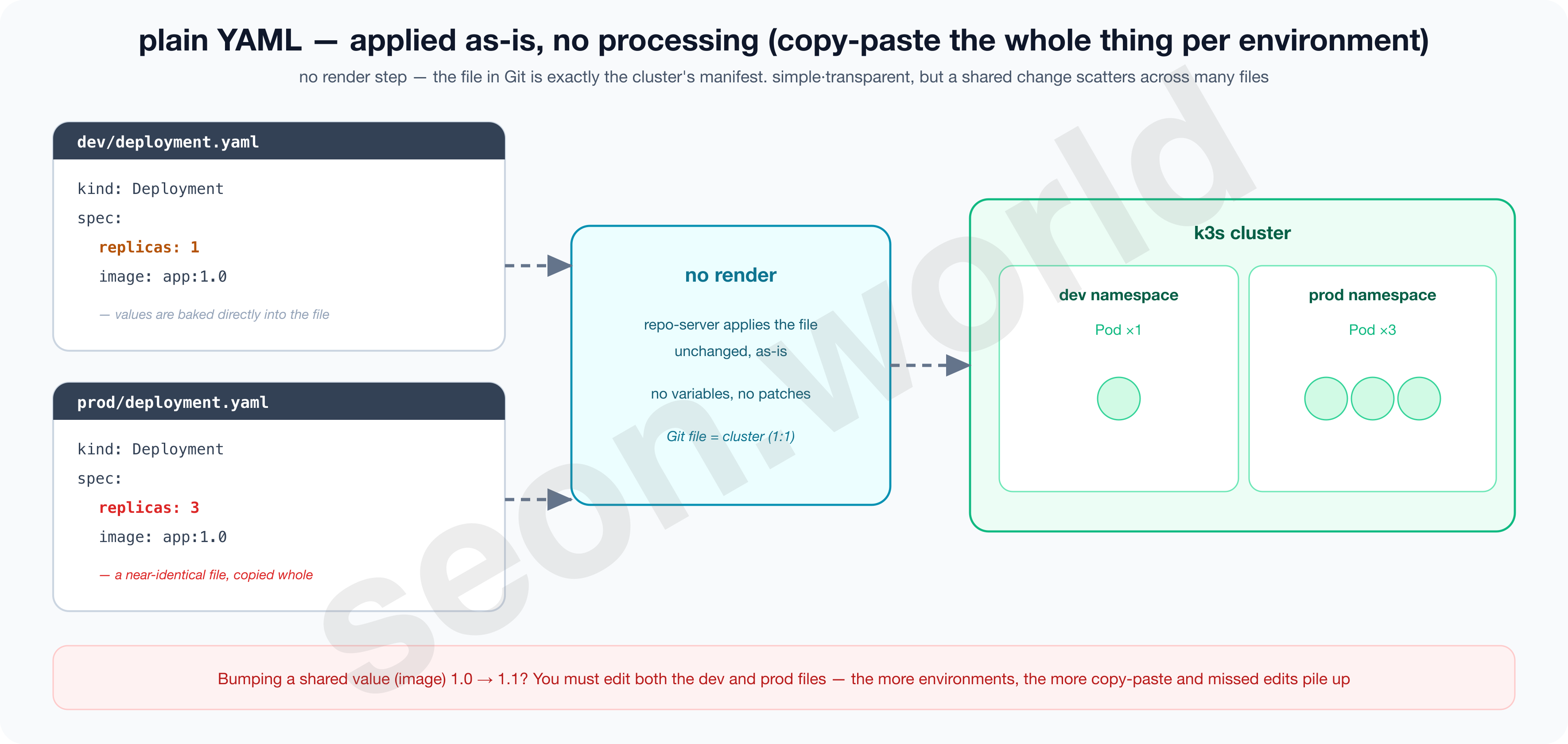
plain YAML — as-is, no processing
plain is literally no processing. Put fully filled-in, complete YAML like deployment.yaml and service.yaml in a directory, and ArgoCD’s repo-server applies it to the cluster unchanged, as-is.
There’s no rendering step at all, so the characters written in Git are exactly the cluster’s state, which means what gets deployed reads without doubt and there’s no syntax to learn. It is “declarative object configuration (kubectl apply -f)” itself (Kubernetes — Object Management).
The problem is repetition.
To keep environments like dev and prod that differ by just a line or two, you copy the whole file (splitting into separate directories or such) and fix only those lines, and even bumping one shared image tag means hand-editing every copied file.
The more targets, the faster duplication and omissions (fixing only one side) pile up. The image below shows that limit — two nearly identical files exist separately because of one replicas line.
Kustomize — layering with base + overlay (no templates)
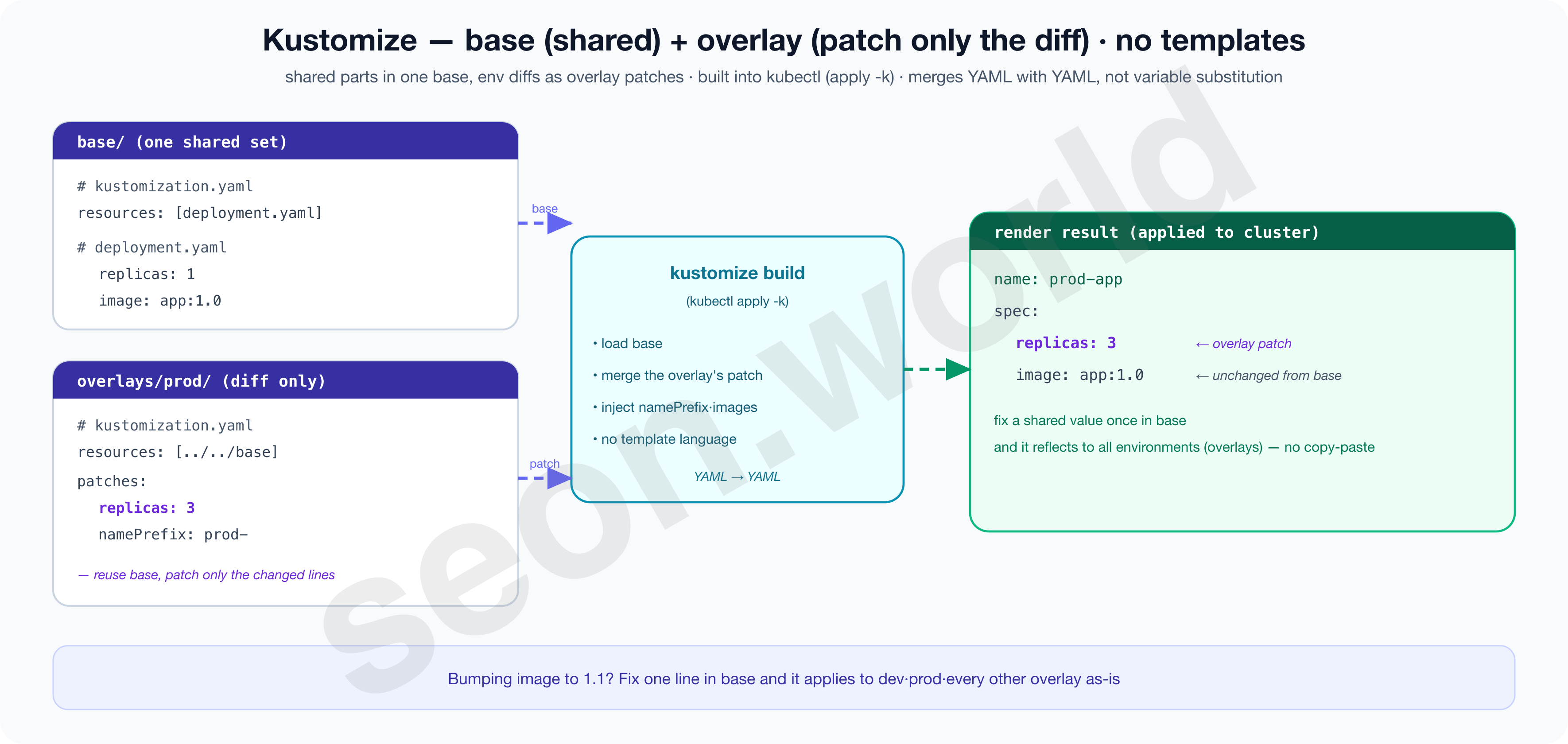
Kustomize solves that repetition without copy-paste.
The Kubernetes official docs define it as “a standalone tool to customize Kubernetes objects through a kustomization file,” and since 1.14 it’s built into kubectl, usable directly with kubectl apply -k (Kubernetes — Kustomize). The core concepts are base and overlay.
Keep one copy of the shared manifest in base/ (e.g. a Deployment with replicas 1), and write only the per-environment differences as a patch in overlays/prod/’s kustomization.yaml (e.g. “replicas to 3,” “prefix names with prod-”). Then kustomize build reads the base and overlays the patch to produce the final YAML.
The decisive trait is that there’s no template language — it’s not variable substitution like {{ }} but merging YAML on top of YAML to make another plain YAML, so the result reads as-is and “what changed and how” is visible.
Shared values (image tags, etc.) reflect to every overlay by fixing just one place in base, so plain’s copy-paste problem disappears. In return, it’s weak at complex expressions like conditional branching or repeated generation.
The image below shows, with real files, how one base + a prod overlay’s patch merge into the final YAML.
Helm — parameterizing with charts and values (a template engine)
Helm takes a different approach.
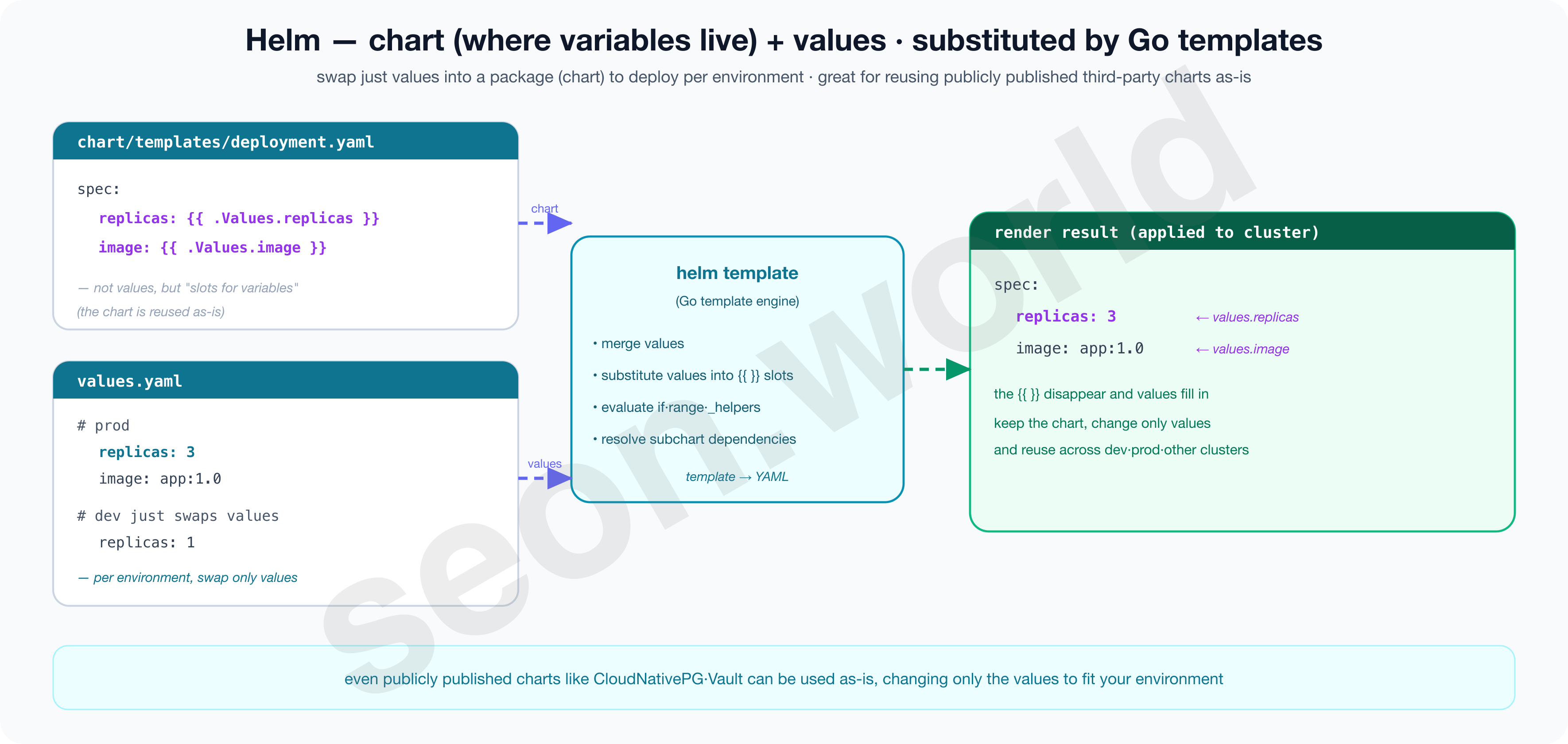
Calling itself “the package manager for Kubernetes” (Helm), it bundles an application into a package called a chart. The manifests in the chart’s templates/ don’t write values directly but place Go template variable slots like {{ .Values.replicas }}, and the actual values are written separately in values.yaml.
At deploy time, Helm slots the values into place (substitution) to render the final manifests.
So keeping the chart and just swapping the values lets you deploy with the same chart to dev and prod, and even other clusters.
On top of this, it supports conditionals (if), loops (range), shared helpers (_helpers.tpl), and dependencies on other charts (subcharts), giving it the strongest expressiveness.
That makes it especially good for pulling in complex software someone else has published, chart and all, and changing only the values to fit my environment (public charts usually come from official chart repositories).
Because a template language sits in between, “the text written in Git” and “the YAML that will actually be applied” are one step apart. So you need the habit of expanding the render result in advance with helm template to check it.
The image below shows the process of variable slots ({{ }}) being substituted with values into the final YAML.
| Aspect | plain YAML | Kustomize | Helm |
|---|---|---|---|
| Processing | none (apply as-is) | base + overlay patch·merge | Go template variable substitution |
| Template language | none | none | yes ({{ }}) |
| Parameterization·expressiveness | none | medium (patch·field injection) | high (conditionals·loops·dependencies) |
| Output transparency | highest (source = result) | high (YAML→YAML) | low (must render to see) |
| Built into kubectl | apply only (-f) | yes (-k) | no (separate tool) |
| Reuse·distribution | low (copy-paste) | medium (base reuse) | high (shared via charts·repos) |
| Learning·complexity | lowest | low | medium~high |
| Best fit | a few static resources | manifests I declare myself | complex external public charts |
In short, the three aren’t a matter of better or worse but of purpose — plain for a small number of static resources, template-free and clean Kustomize for manifests I declare myself, and Helm for pulling in complex external public charts.
4-2. App organization — app-of-apps vs ApplicationSet
Next is “how to register those written manifests in ArgoCD.”
ArgoCD handles the deploy unit as a CRD called Application.
It’s a single sheet that says “sync this Git path to this namespace of this cluster.” With one or two apps, you can write these Applications by hand, one at a time. But once you have dozens to bring up, making the Applications themselves becomes work, and it’s easy to miss some or let them drift apart.
So you have to decide “how to create Applications systematically (automatically, if possible).” ArgoCD offers two paths.
app-of-apps is, in the official docs’ exact words, a pattern that “declares one ArgoCD app consisting only of other apps” (Argo CD — Cluster Bootstrapping). You write a list of child Applications into one parent root Application, and syncing just that root creates the children one after another.
It suits a bootstrap entry point that “stands up the cluster’s skeleton in one shot.” But because you write the child list directly, you have to add one more child Application by hand each time a new app appears.
ApplicationSet goes one step further — in the official docs’ words, a controller that “automates and flexibly manages Applications across many clusters and apps” (Argo CD — ApplicationSet).
The core is the generator.
A generator produces parameters, and those parameters are slotted into a single template to stamp out Applications. Generators include list (giving the list directly), cluster (scanning registered clusters), git (scanning a repo’s folders and files), and matrix (multiplying two together).
In particular, the git generator automatically creates an Application for each folder under a set path (e.g. apps/*), so just adding a new folder makes the app appear on its own.
There’s no need for a human to create the Application directly.
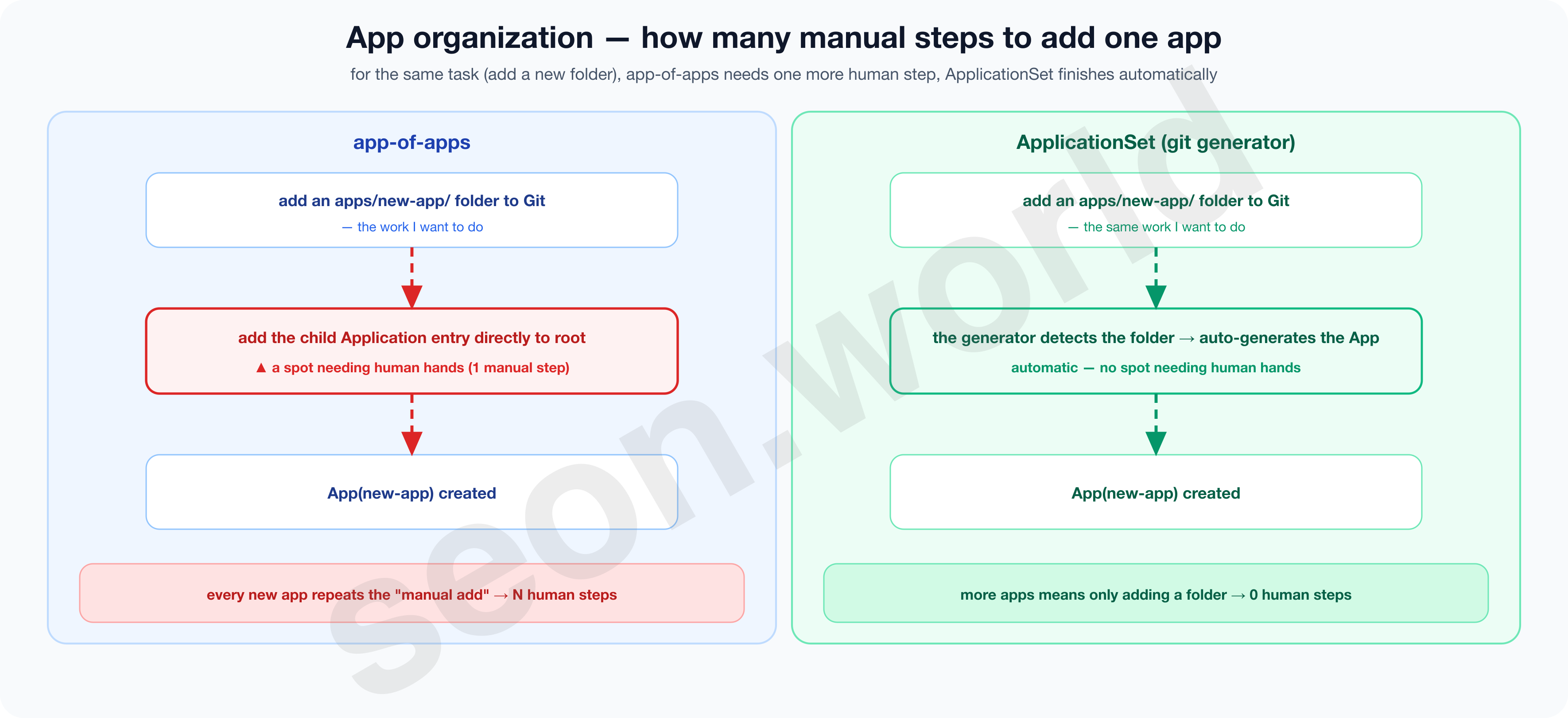
The two aren’t so much competitors as different layers. app-of-apps is good at making “one initial entry point,” ApplicationSet at “mass-producing apps beneath it.”
So they’re commonly used together — root (app-of-apps) stands up the ApplicationSets, and each ApplicationSet scans folders to stamp out the actual apps.
4-3. Repository structure — monorepo vs polyrepo
Third is “in which repository to keep those declarations.”
There’s an order to this. There’s a principle to note first, and then you decide whether to keep that repository as one or split it into many.
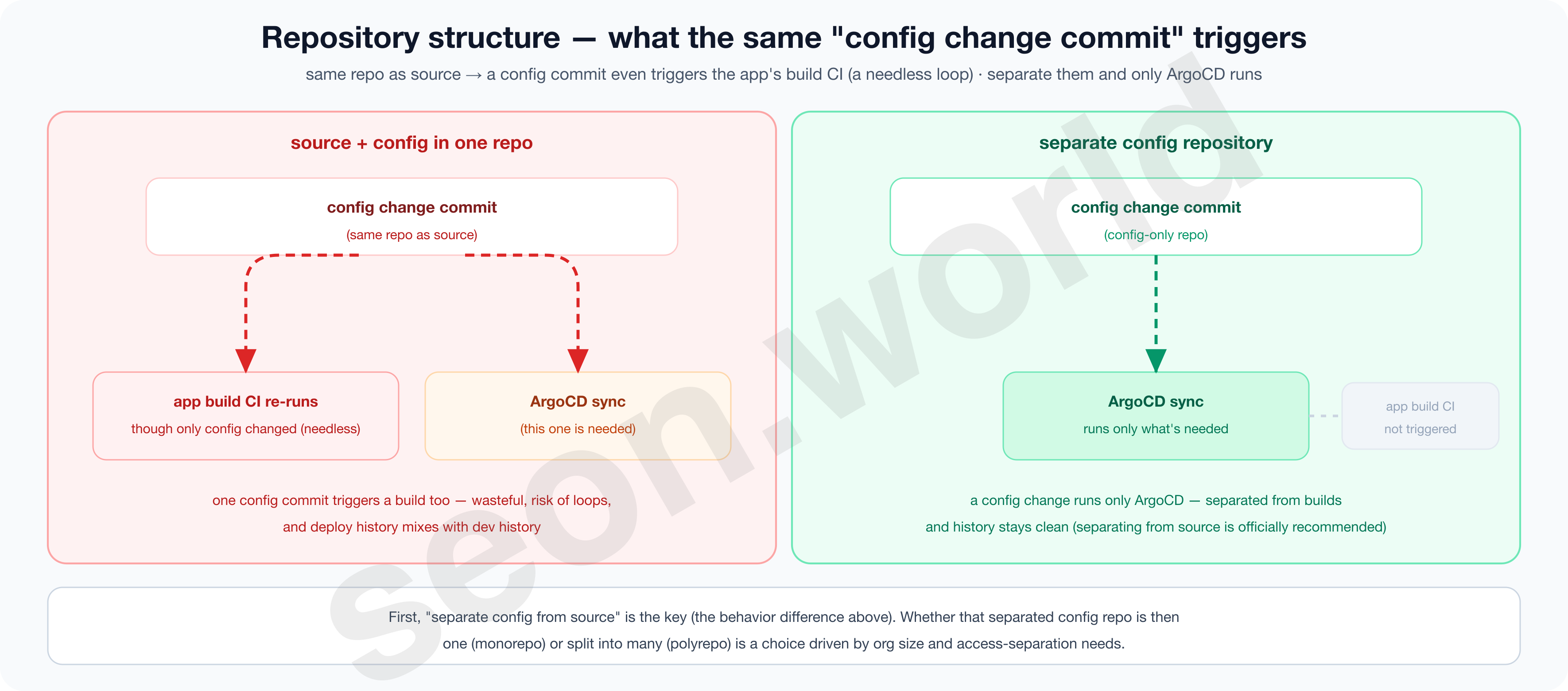
The principle is to separate config (manifests) from app source code.
The ArgoCD official guide nails it down, “strongly recommending that Kubernetes manifests live in a separate Git repository from the application source code” (Argo CD — Best Practices). The reasons follow.
- ① If source and config are in one repo, it’s easy to create an infinite loop where changing only config re-runs the app’s build CI.
- ② Deploy history (config commits) and development history (source commits) get tangled, making the audit log messy.
- ③ It’s hard to separate the permissions of “people who touch the code” and “people who deploy to production.”
What remains is how to keep that “config repository.”
- monorepo gathers the entire cluster’s declarations in one repo, separated by folders (
platform/,workloads/, …)- The whole picture of changes fits in one view, and the ApplicationSet’s git generator only needs to scan one repo, keeping things simple
- But once an organization gets very large, it’s limited at finely dividing permissions like “this folder for this team only.”
- polyrepo splits config repos per team or domain
- You can cleanly divide access permissions per repo, but it gets cumbersome to see the whole cluster at once or to make changes spanning multiple repos. (Better or worse between these two isn’t a matter of a right answer so much as a trade-off driven by org size and permission needs.)
4-4. Repository access — HTTPS vs SSH deploy key vs GitHub App
The last is how ArgoCD reads that (usually private) repository.
Per the Pull model from section 2, ArgoCD’s repo-server, the party doing the reading, is inside the cluster and uses only outbound connections. Still, reading a private repo needs credentials, and each method differs in the scope its permission reaches and whether it can be narrowed to read-only. The official docs support HTTPS (user/token), SSH private key (deploy key), GitHub App, TLS client certificates, and more (Argo CD — Private Repositories).
- HTTPS · Personal Access Token
- You attach using the token like a password.
- Simplest, but the token easily broadens to reach many repos at the account level, and usually carries read/write permission together.
- If leaked, the blast radius is large.
- SSH · Deploy Key
- GitHub’s official docs define a deploy key as “an SSH key that grants access to a single repository,” and specify that “it’s read-only by default, and write access can be granted when adding it” (GitHub — Deploy keys).
- That is, its scope is limited to that one repository and it can be issued read-only, fitting the principle of least privilege best.
- You register the public key as the repository’s deploy key and put the private key into ArgoCD.
- GitHub App
- A fine-grained method that reaches only chosen repos and permissions per installation.
- The installation token is a short-lived token that expires in about an hour, so you use it with auto-renewal (GitHub — App installation auth), and auditing and revocation stay clean.
- Suits org and many-repo scale, but the initial setup is somewhat complex.
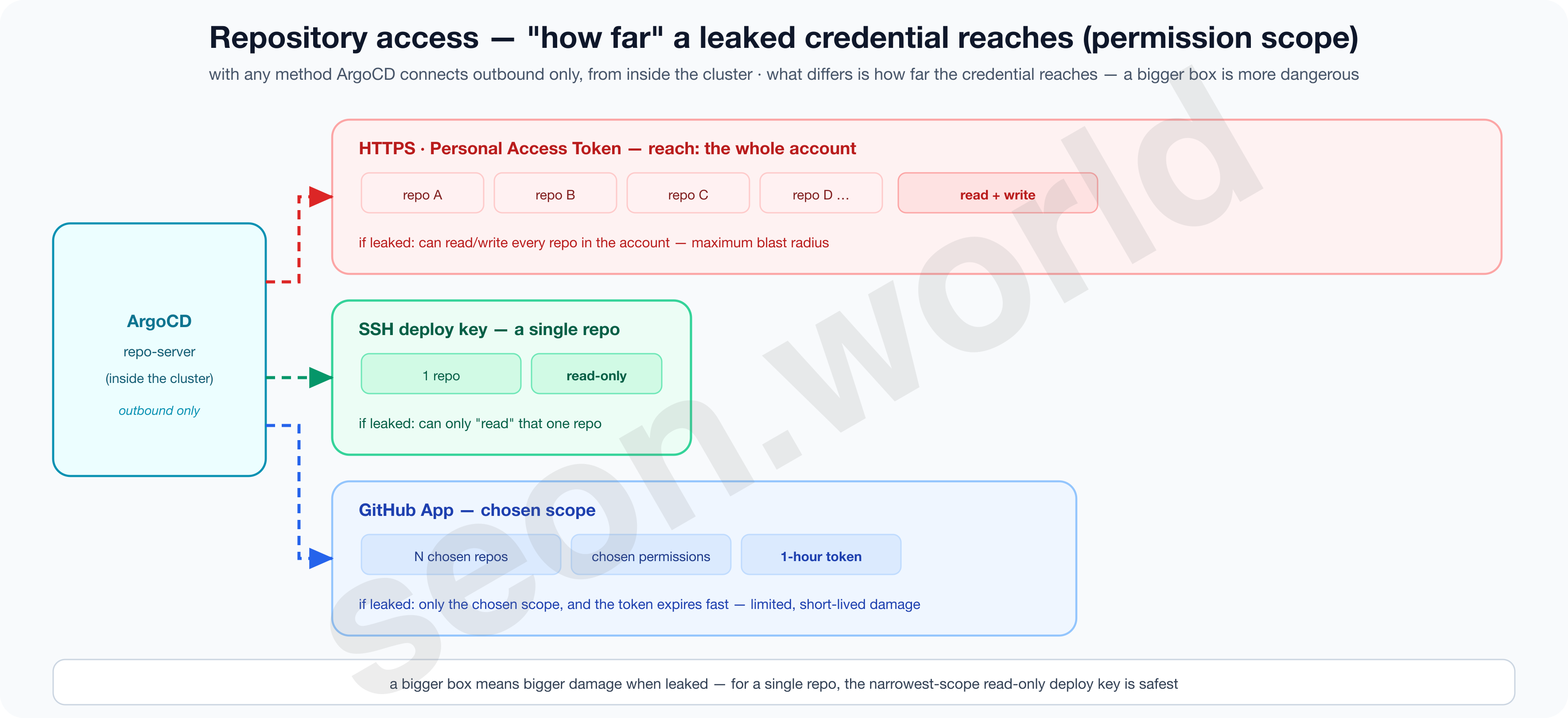
Whichever method, the credential stays only inside the cluster and uses only outbound connections — that’s the same. What splits is “how far you can narrow the permission,” and for a single repository, the deploy key, limited to that repo and read-only, is the simplest and safest.
4-5. What does my homelab’s setup look like? — what, why, and so what do I gain
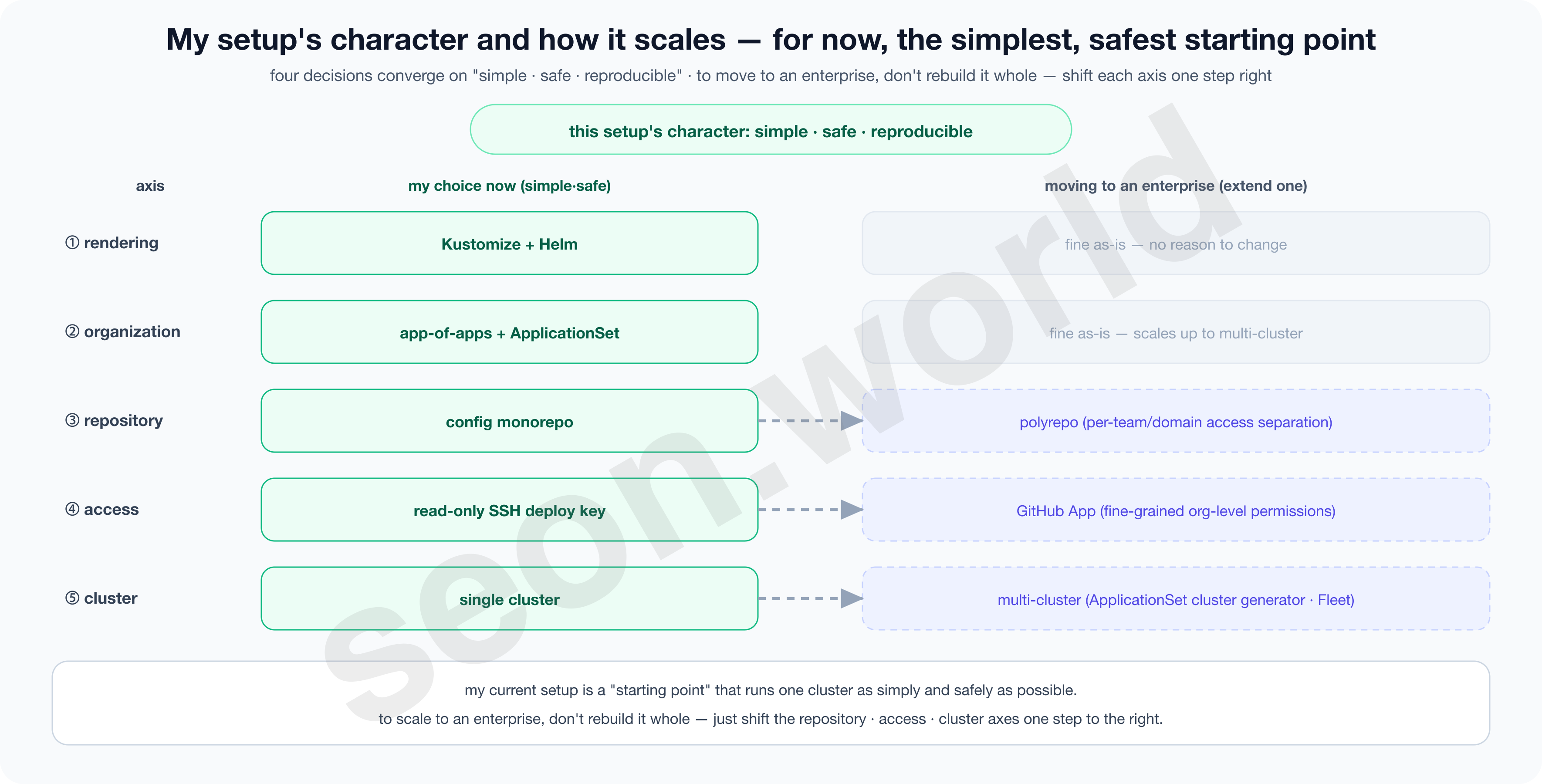
- Rendering
- Kustomize by default + Helm alongside.
- The resources I declare myself have almost no per-environment branching, so Kustomize, where the result YAML is visible as-is with no template language, was simple and easy to debug.
- Conversely, charts someone else made well and published — like operators — I don’t bother unpacking and porting; I pull them in as-is with Helm.
- What I use myself stays transparent, what others made gets reused, and the management burden is minimized on both sides.
- Organization
- app-of-apps + ApplicationSet.
- I keep root (app-of-apps) as the bootstrap entry point, and beneath it the ApplicationSets scan folders with a git generator to mass-produce apps.
- Adding an app needs no hand-made Application (just add a folder), and rebuilding the cluster restores everything from the single root.
- Reproducibility and scalability come together.
- Repository
- A config monorepo separated from source.
- Manifests are separated from app source (the official recommendation), but on a single-cluster homelab I gathered that config into one repo.
- It avoids CI loops, history tangling, and permission issues through separation, while seeing all changes in one view and keeping the generator simple.
- Access
- A read-only SSH deploy key.
- On top of the Pull model that keeps credentials only inside the cluster, I narrowed the permission to that one repository, read-only.
- Even if the key leaks, it can’t do more than read that repo, so the blast radius is structurally bound.
This setup’s character, in one line, is “single cluster, one config monorepo, read-only pull” — simple, safe, and reproducible as a whole.
At the same time, changing just one axis at a time makes it a foundation that scales to an enterprise (repository to polyrepo, access to GitHub App, target to multi-cluster).
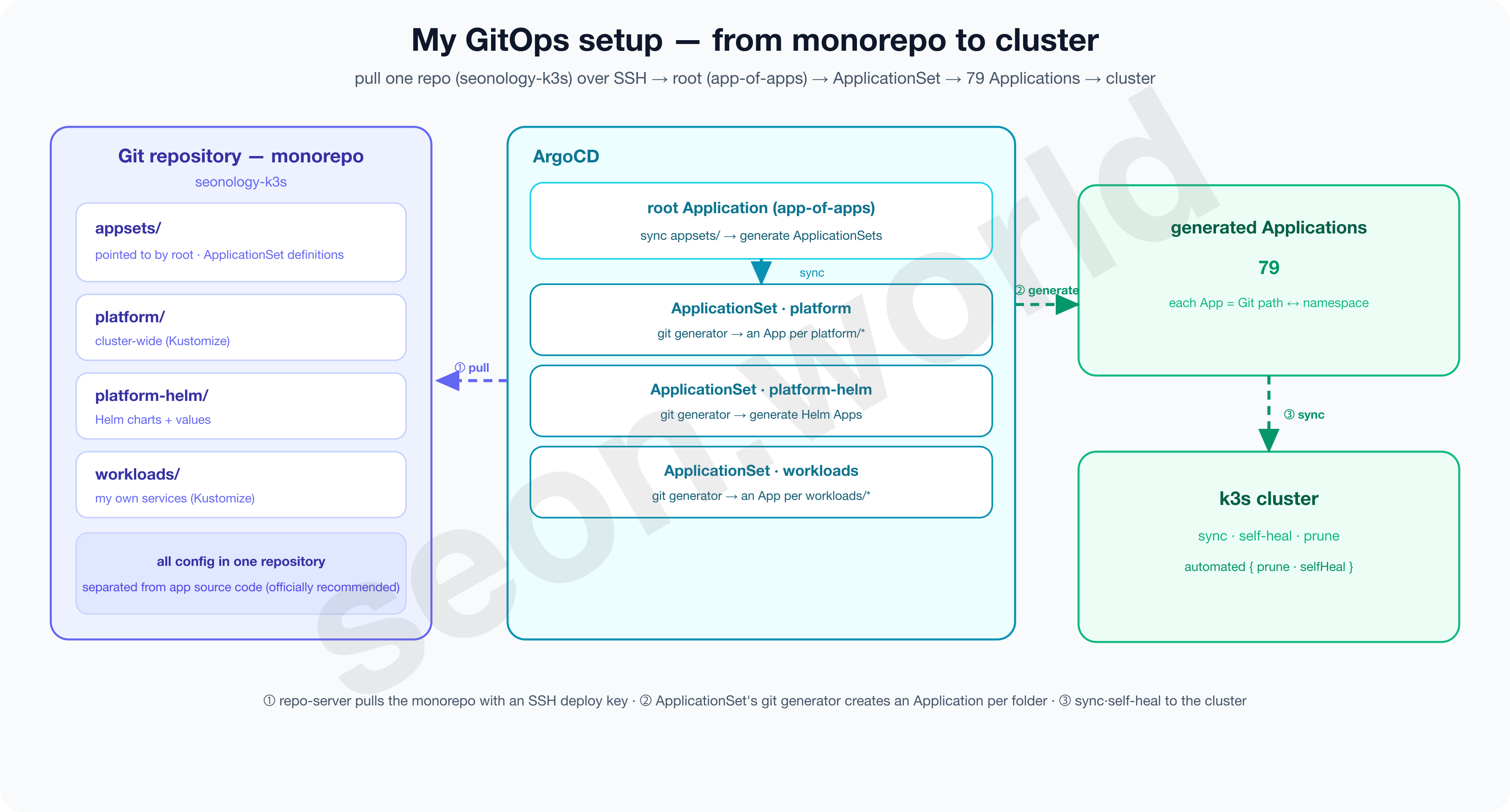
# ArgoCD repo connection secret — the key layout alone tells you the method.
$ kubectl get secret repo-k3s-config -n argocd -o jsonpath='{.data}' | jq 'keys'
[
  "sshPrivateKey",   # connect via SSH deploy key — credentials stay in the cluster
  "type",            # git
  "url"              # exactly one repo = monorepo
]
These decisions together finish the preparation to move part 4’s imperatively-built CloudNativePG into GitOps. In the next part (part 6), I’ll actually build this design by hand.
From creating the config repository → installing ArgoCD → connecting the repository with a read-only deploy key → standing up the root (app-of-apps) and ApplicationSet skeleton.
And in part 7, I’ll lay CNPG on top of it — declaring the operator with Helm and the Cluster CR with Kustomize — and take it all the way to running it as GitOps.
Even after deciding to use ArgoCD, four more things need deciding — rendering (Kustomize by default + Helm alongside), organization (app-of-apps for bootstrap + ApplicationSet for mass production), repository (a config monorepo separated from source), access (a read-only SSH deploy key). The reason for each choice converges into one — “simple, safe, reproducible” — and at the same time becomes a foundation that scales to an enterprise by changing just one axis at a time.
5. Wrapping up — and what’s next
This part didn’t add a single line of command (kubectl apply).
Instead, it finished the design for putting that command down. I confirmed that GitOps’s four principles fill exactly the four things that broke under hand-run ops (drift, history, reproducibility, audit) (sections 1 and 2), chose ArgoCD as the tool to run that Pull (section 3), and decided how to write, group, keep, and read the manifests on top of it, along four axes (section 4).
Spread out, it looks like a lot of decisions, but they all converge in one direction — simple, safe, and reproducible.
Rendering keeps Kustomize, whose result is visible as-is, by default while pulling in complex charts others made with Helm; organization uses app-of-apps + ApplicationSet, where everything is restored from a single root; the repository is a config monorepo separated from source; access is a read-only deploy key that reads only that one repo.
It’s a plan that’s both the simplest, safest starting point for running a single cluster, and one you can scale to an enterprise by changing just one axis at a time.
With the design done, from the next part on I build this by hand.
- Part 6 · Bootstrap — install ArgoCD, connect the config repository with a read-only deploy key, then stand up the cluster’s skeleton with root (app-of-apps) and ApplicationSet. And I’ll see with my own eyes how ArgoCD reverts a change someone made directly with
kubectl edit(self-heal). - Part 7 · Apply — move the CloudNativePG I brought up imperatively in part 4 into GitOps. I’ll declare the operator with Helm and the
ClusterCR with Kustomize, and finish off the last remaining homework, secret (password) management.
It’s time to make a single commit take the place where I used to type kubectl apply by hand.
References / Sources
- GitOps definition and principles — OpenGitOps (CNCF) · GitLab — What is GitOps · gitops.tech · CNCF — GitOps in 2025
- Kubernetes basics — Object Management · Controllers
- ArgoCD — Official docs · Cluster Bootstrapping (app-of-apps) · ApplicationSet · Best Practices · Private Repositories
- Flux CD — Official site
- Rancher Fleet — AWS Prescriptive Guidance · Fleet — GitRepo Targets
- Rendering tools — Kubernetes — Kustomize · Helm
- Governance and adoption — Argo CNCF Graduated (2022) · Flux CNCF Graduated (2022) · CNCF — ArgoCD end-user survey (2025)
- Repository access — GitHub — Deploy keys · GitHub — App installation auth