Hybrid k3s · Part 4
Hybrid k3s #4: Building a unified database on k3s — five Postgres operators, and CloudNativePG
0. About this series
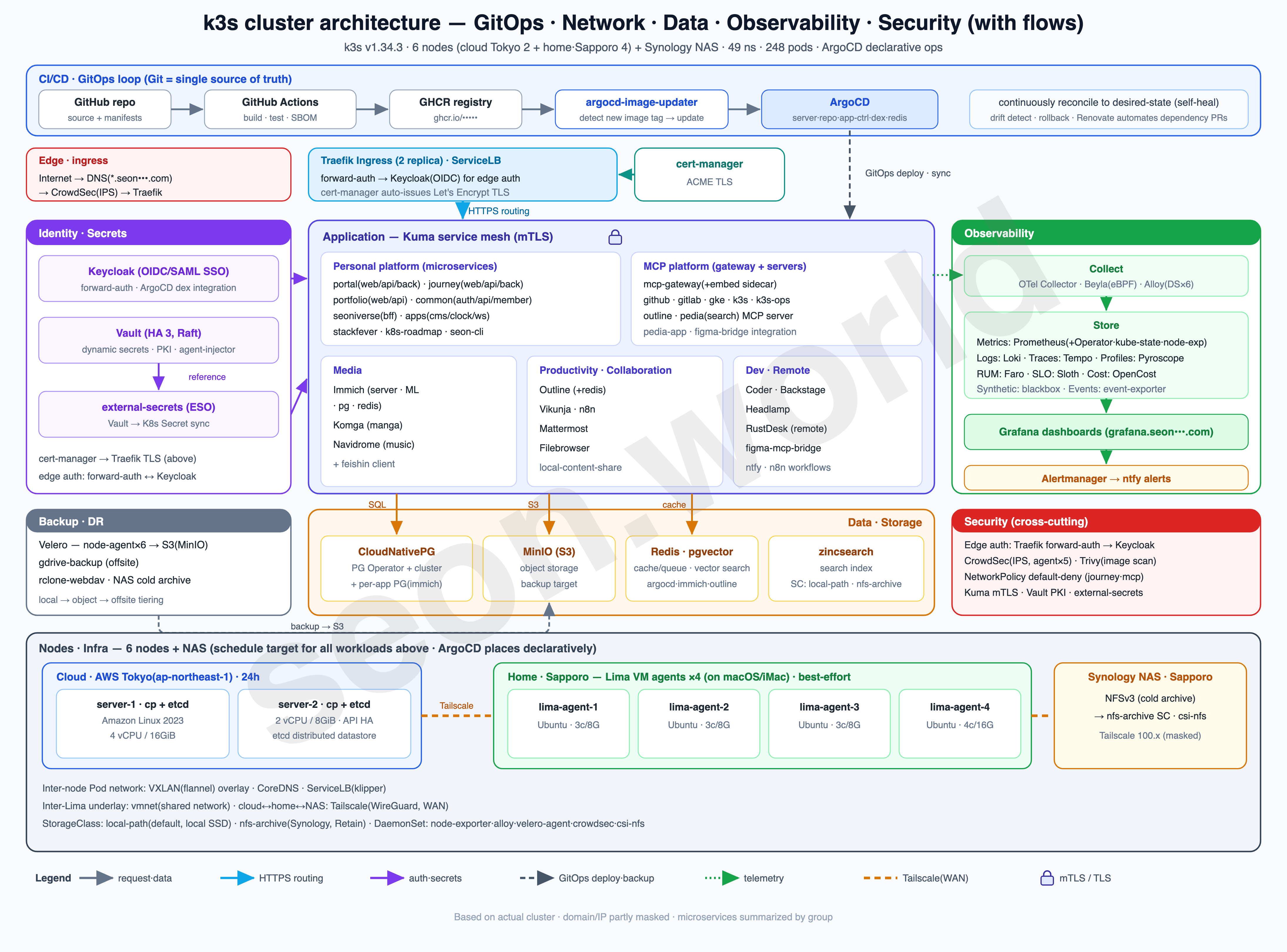
This series is a record — written one piece at a time — of how I actually built the homelab in the diagram above, the one that’s still running as I write this.
What began as a toy project from a simple “could this even work?” turned, through satisfying performance and endless tearing-down-and-rebuilding, into a genuine toy that takes the edge off the stress built up at work. It isn’t a resource-rich cluster, but it’s been more than enough to get a real taste of Kubernetes, and it keeps handing me the next thing I want to try.
- 6 nodes — 2 Lightsail servers (control plane + etcd) in the cloud (AWS Tokyo) + 4 Lima VM agents on a home (Sapporo) iMac
- 19 vCPU / 61 GiB total, 49 namespaces, 248 pods (150 running)
- Deployed with ArgoCD, auth via Keycloak OIDC, with CloudNativePG, Vault, CrowdSec, Prometheus/Grafana and more running on top
This time, on top of the six-node hybrid cluster I’d built up through part 3, I dissect five Operators for running PostgreSQL reliably, and end up building an HA cluster — and its backups — with CloudNativePG.
1. Kubernetes, databases, and the Operator
“Kubernetes supports stateful workloads; I do not.” — Kelsey Hightower (2018)
That’s a one-liner Kelsey Hightower left on X (Twitter) in 2018, the man widely known as a Kubernetes evangelist. “Kubernetes supports stateful workloads — but I don’t,” meaning “I wouldn’t put a database on it myself.” And it wasn’t just his opinion: putting databases on Kubernetes was long frowned upon across the infrastructure industry.
The reasoning is clear. A Pod can go down at any moment (it’s ephemeral), and nodes get swapped out without warning. A stateless app can simply be brought back up if it falls over, but a DB that holds data can have its fate decided the moment a single Pod disappears. So “leave the DB to a managed service like RDS or Cloud SQL” was the accepted wisdom for a long time.
Two things overturned that wisdom. The first was the maturing of StatefulSet and PersistentVolume. Even if a Pod restarts or moves to another node, it can keep the same volume and a stable network ID — which laid the groundwork for stateful workloads. The second was the Operator pattern.
The Operator is a concept CoreOS introduced in 2016 — in a phrase, “putting operational knowledge into software.” It takes the operational work that used to live in an admin’s head or in shell scripts — provisioning, version upgrades, failover, backups, point-in-time recovery (PITR) — and moves it into the code of a controller that runs right alongside the workload. You declare only the “desired state” in YAML, and the Operator continuously reconciles it against the current state, converging the two. The first examples were CoreOS’s etcd Operator and Prometheus Operator.
The harder a piece of software is to operate — and a DB is exactly that — the more this pattern pays off. And the PostgreSQL ecosystem is where Operators compete most fiercely. In the next chapter I compare these solutions, each with its own architectural philosophy, one at a time.
2. Comparing five major Postgres Operator architectures
The major PostgreSQL Operators most widely used today across the CNCF ecosystem and enterprise environments are below. Each has its own architecture and trade-offs, and the right pick shifts with your infrastructure’s requirements.
One caveat: my reason for picking one of these five leans heavily toward “what fits my homelab” and “what I personally wanted more hands-on experience with.” Please read it knowing that’s a different lens from evaluating them for production use at a company.
① Zalando Postgres Operator
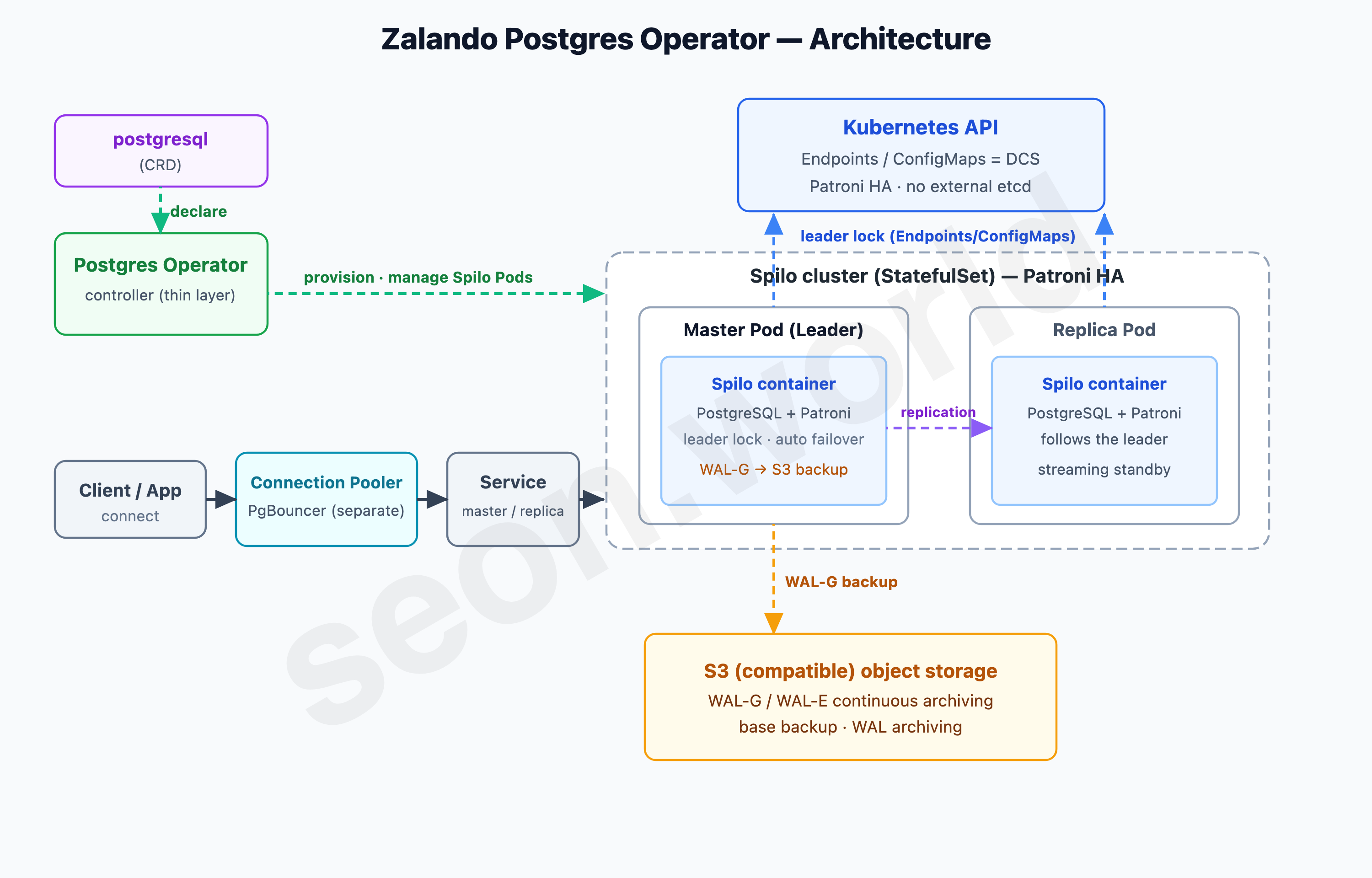
The first one I looked at was the elder statesman of this space, Zalando Postgres Operator. Built by the German e-commerce company Zalando for running its own PostgreSQL, and hardened over years of running hundreds of clusters in-house, it’s among the oldest Operators around.
The Postgres Operator delivers an easy to run highly-available PostgreSQL clusters on Kubernetes (K8s) powered by Patroni. — Zalando postgres-operator official README
At its core is a Docker image called Spilo. Spilo bundles PostgreSQL, the HA manager Patroni, and the S3 backup/restore tool WAL-G into a single image; the Operator itself sits on top as a relatively thin control layer that “stands up Spilo Pods once you declare the cluster you want via a CRD.” The actual high availability — leader election and automatic failover — is handled by the Patroni inside each Pod, and if your application connections need pooling, you can stand up PgBouncer separately as a connection pooler.
Let me clear up a common misconception here: that “using Patroni means you need a separate external consensus store (DCS) like etcd or ZooKeeper.” On Kubernetes, that’s not the case. In Zalando Operator’s defaults, Patroni uses Kubernetes resources themselves (Endpoints, or ConfigMaps) as the DCS, and by default the external etcd connection is simply left unset. Patroni takes a leader lock with a TTL (30s by default) on that K8s object and refreshes it periodically; if the leader vanishes, the remaining nodes compare WAL positions and elect a new one.
Its strength is the sheer weight of precedent and information. Because it’s the oldest and most battle-tested in large-scale production, when you hit a problem a search usually turns up a prior case. The license is the permissive MIT, too. That said, this Operator was essentially built for Zalando’s own needs, so there’s no official commercial support; maintenance continues as of 2026, but the release cadence has visibly slowed compared to the newer CloudNativePG.
② CrunchyData PGO
Next is CrunchyData PGO. As its GitHub repo describes it — “Production PostgreSQL for Kubernetes, from high availability Postgres clusters to full-scale database-as-a-service” — it was built by a database-focused company, and it shows: it’s the Operator that puts the most weight on “data protection and backup.”
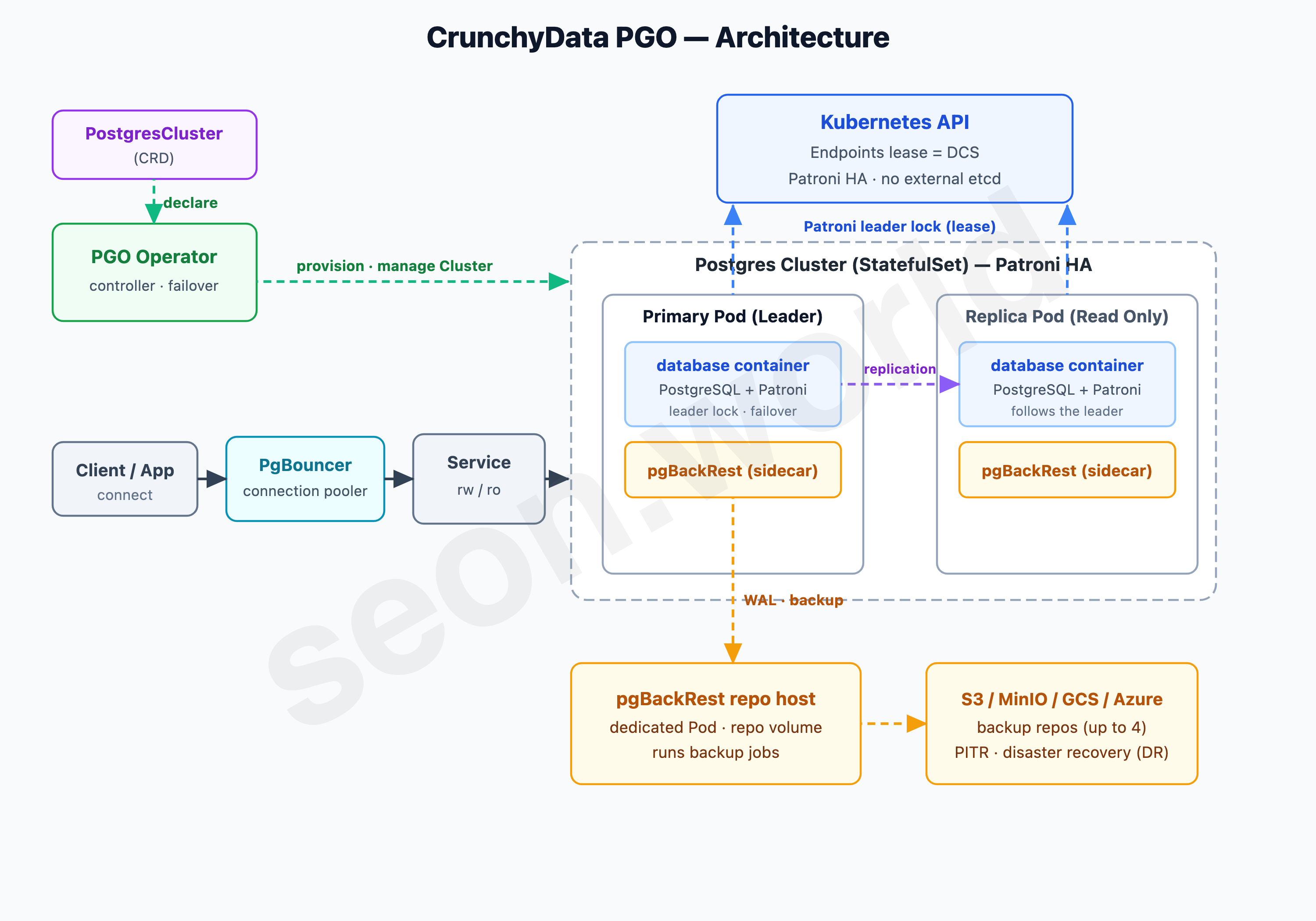
HA itself is the same lineage as Zalando. Inside each Postgres Pod’s database container, PostgreSQL and Patroni run together to handle automatic failover, and the consensus store (DCS) is the Kubernetes API (Endpoints lease) — no external etcd here either. Applications connect to the Primary and Replicas through PgBouncer (a connection pooler) and Services (rw/ro).
PGO’s real strength is its backups. It integrates pgBackRest — the de facto standard PostgreSQL backup tool — as a sidecar container on each Postgres Pod plus a dedicated repo host Pod. With just spec.backups.pgbackrest configuration, it archives all transaction logs (WAL) to up to four storage locations (S3, MinIO, GCS, Azure Blob), so even if a whole node is lost, point-in-time recovery (PITR) and disaster recovery (DR) are guaranteed. If you take backup and recovery seriously, it’s the most reassuring choice.
But getting it into the homelab had a licensing catch. PGO’s source code is Apache 2.0, but the production container images are bound by the Crunchy Data Developer Program terms, and using those images in production effectively requires a commercial agreement. It’s fine for personal learning or a homelab, but measured against “can I extend this to in-house or commercial use whenever I want,” it was an uneasy constraint.
③ Percona Operator for PostgreSQL
The third is Percona Operator for PostgreSQL. Built by Percona, which has run an open-source DB business for over 18 years, it’s the choice where “fully open source” comes through most clearly.
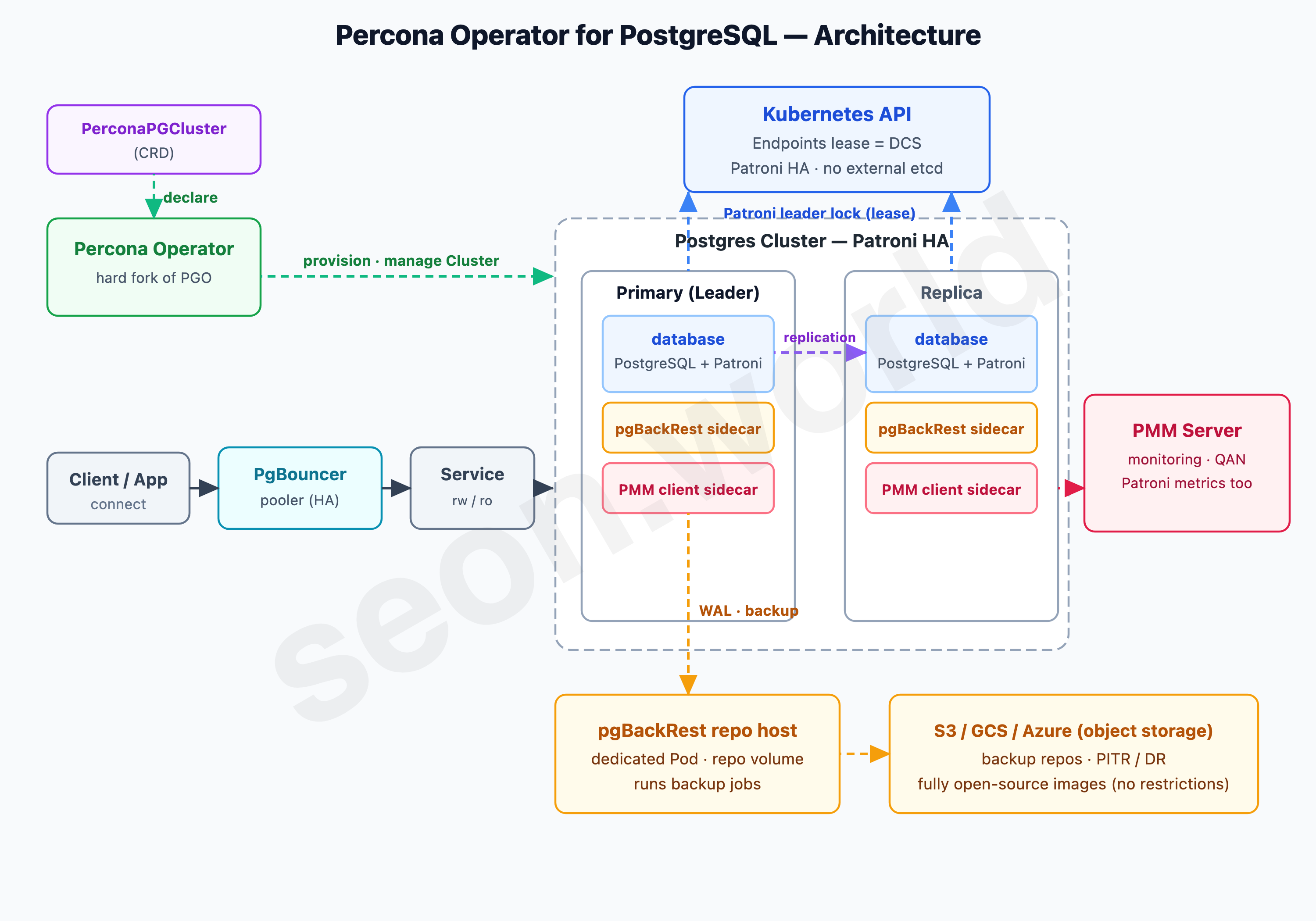
Its architecture is rooted in the CrunchyData PGO we just saw. Percona hard-forked PGO (becoming a fully independent project from 3.0.0 onward) and grew it from there. So high availability is again handled by Patroni, the consensus store by the Kubernetes API (Endpoints lease), backups by pgBackRest, and connection pooling by PgBouncer — inheriting PGO’s proven skeleton as-is.
Two things set Percona apart. One is PMM (Percona Monitoring and Management) integration. A PMM Client sidecar attaches to each Postgres Pod and ships query analytics (QAN), system metrics, and even Patroni’s metrics to the PMM Server. Production-grade observability comes along without much extra setup.
The other was the clincher: the container images are fully open source (Apache 2.0), with no usage restrictions. That’s the exact opposite of CrunchyData requiring a commercial agreement for production images. Percona itself markets this point as “Migrate to Freedom.” Thinking about starting in a homelab and possibly extending to in-house or commercial use someday, that “no restrictions” was a big draw.
The single reason it still fell out of the final cut was weight. Because it carries PGO’s lineage, each Pod gets several containers (database, pgBackRest, PMM), and you also have to stand up a PMM Server separately. It’s a reasonable setup for an enterprise, but for my homelab splitting 19 vCPU, it was a touch heavy.
④ StackGres
The fourth is StackGres. Built by Spain’s OnGres, this Operator reaches beyond a mere HA tool, billing itself as “a complete PostgreSQL platform (DBaaS) on Kubernetes.”
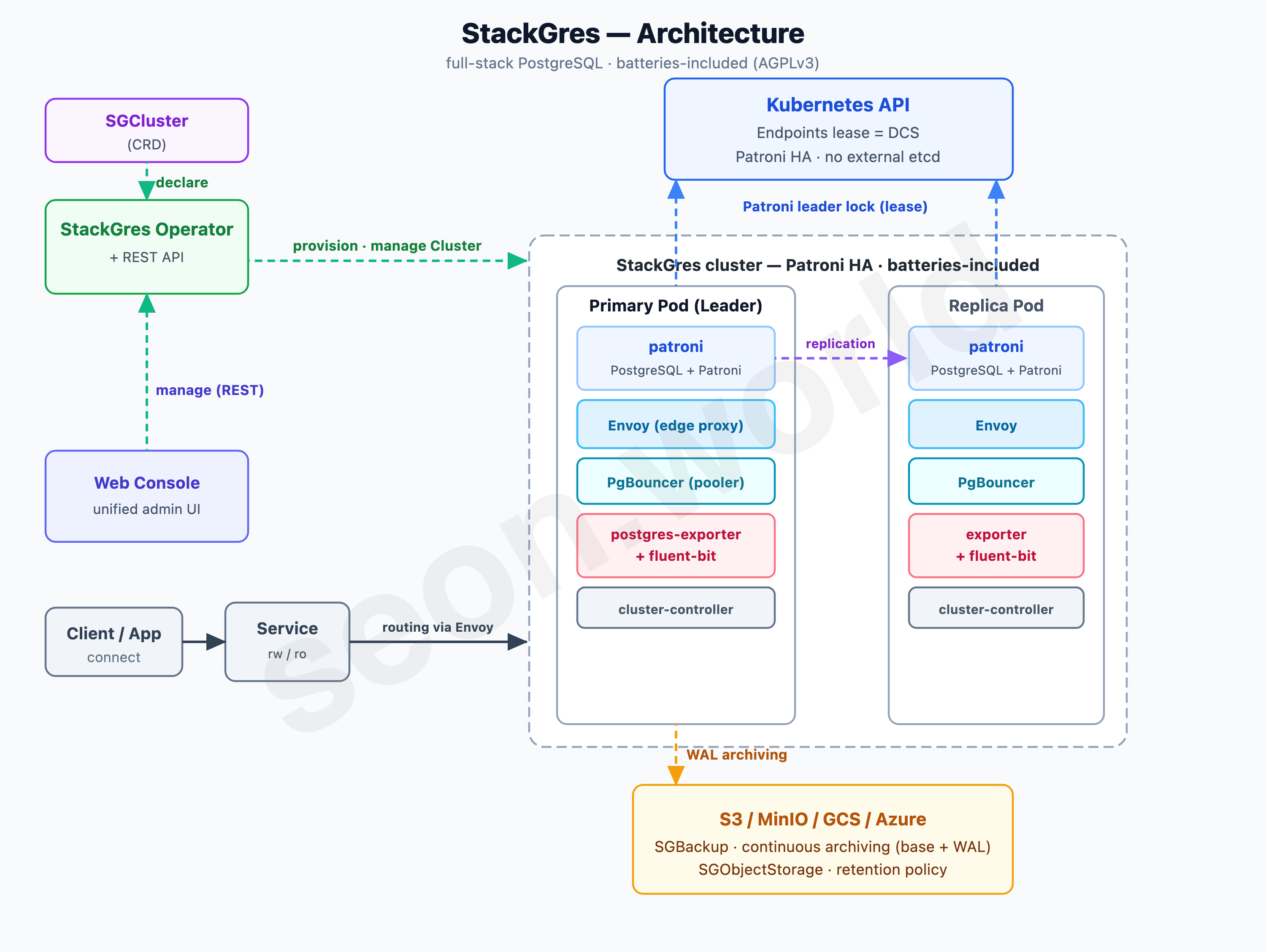
The HA foundation is again Patroni, the consensus store the Kubernetes API (no external etcd) — same as above so far. What sets StackGres apart is its “pack everything into one Pod (batteries-included)” design. Inside a single Postgres Pod run, alongside PostgreSQL+Patroni, an Envoy proxy (mandatory) that handles all traffic, the PgBouncer connection pooler, a postgres-exporter for metrics, fluent-bit for logs, and a cluster-controller that reconciles local state — several containers together. The Envoy here isn’t just a proxy; it parses the Postgres wire protocol and even produces connection statistics.
The operational experience is well thought out, too. A Web Console and REST API are built in by default, so nearly everything you’d do with kubectl can be handled from a UI instead. Backups go through the SGBackup and SGObjectStorage CRDs, with continuous archiving (base backup + WAL) to S3, MinIO, GCS, or Azure. True to “batteries included,” it’s the friendliest all-in-one for someone just getting started.
The problem was the license. StackGres’s core code is AGPL 3.0. Using it as-is is fine, but the moment you put something on top and offer it as a service, the source-disclosure (copyleft) obligation can reach your own code. It isn’t a problem right now, but thinking about the homelab-expansion scenario of “I might put my own service on this cluster and expose it externally,” AGPL was a concern I’d rather avoid up front.
⑤ CloudNativePG (CNPG)
Last is CloudNativePG (CNPG). The latest arrival, only showing up in 2022, yet in just two years it overtook Zalando and CrunchyData by GitHub stars to become the most popular PostgreSQL Operator today. Built by EDB (EnterpriseDB), donated to the CNCF Sandbox in January 2025, licensed Apache 2.0.
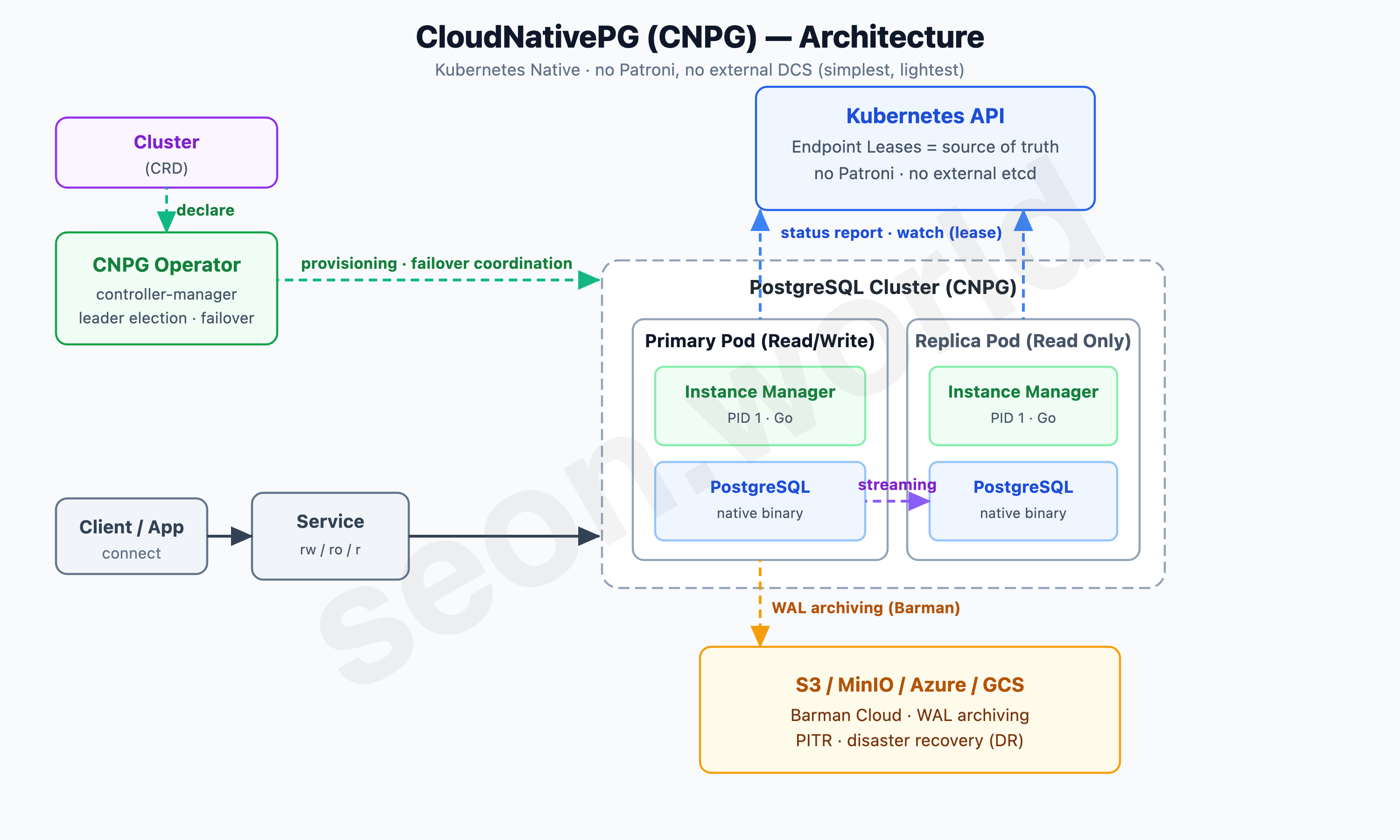
The secret to CNPG vaulting to the front was, paradoxically, “subtraction.” It strips out Patroni entirely — the thing the previous four shared — and uses no external DCS. Instead, each Pod’s Instance Manager (a Go process running as PID 1) directly controls the PostgreSQL native binary, and the Kubernetes API (Endpoint Leases) is the single source of truth for state. Deciding the leader (primary) and failover is handled directly by the Operator (controller-manager) through reconciliation.
The result is extreme simplicity. Inside one Pod there’s no Patroni, no Envoy, no pile of sidecars — just the Instance Manager and PostgreSQL. That means low overhead and easy debugging. Backups use the built-in Barman Cloud, continuously archiving WAL to S3-compatible storage for PITR, and connections are cleanly split across rw, ro, and r Services.
Governance is reassuring, too. Being a CNCF project, no single company can quietly shut it down, multiple vendors offer commercial support, and development moves fastest in this space. In the next chapter I’ll line up the five in one table, then lay out why it ended up being CNPG.
A quick summary table
| Operator | HA engine | Consensus store (DCS) | Pod composition | Backup | License | Governance · activity |
|---|---|---|---|---|---|---|
| ① Zalando | Patroni | K8s API (Endpoints/ConfigMaps) | Spilo (PG+Patroni+WAL-G), separate Pooler | WAL-G → S3 | MIT | in-house · slowing releases |
| ② CrunchyData | Patroni | K8s API (Endpoints lease) | database + pgBackRest sidecar + repo host | pgBackRest (up to 4 repos) | Apache 2.0 · restricted prod images | OSS effectively commercialized |
| ③ Percona | Patroni | K8s API (Endpoints lease) | database + pgBackRest + PMM sidecar | pgBackRest | Apache 2.0 · fully open (no restrictions) | stable company · active |
| ④ StackGres | Patroni | K8s API | batteries (Envoy·PgBouncer·exporter·fluent-bit·controller) | SGBackup · continuous archiving | AGPL 3.0 (copyleft) | OnGres flagship · active |
| ⑤ CloudNativePG | own Instance Manager (no Patroni) | K8s API (Endpoint Leases) | Instance Manager + PostgreSQL (two) | Barman Cloud | Apache 2.0 | CNCF · #1 today · most active |
Lined up, the differences are clear. ①–④ all use Patroni — the real difference is “what you stack on top of that Pod (backup, monitoring, proxy)” and “the license.” And only ⑤ CNPG drops Patroni and adopts its own Instance Manager. The consensus store is the Kubernetes API for all five — the common myth that “using Patroni requires external etcd” is, on Kubernetes, no longer true.
My homelab’s criteria were clear. Splitting 19 vCPU, it had to be lightweight; extending it to in-house or commercial use someday, it had to be free of license strings; and running it long-term, it needed governance that won’t fade.
3. Why I chose CloudNativePG
After comparing all those Operators, the solution that best fit my current homelab (k3s-based) and my plans for it was CloudNativePG (CNPG). Three things clinched it.
① Extreme simplicity and lightness (Kubernetes Native)
By nature, a homelab’s resources (CPU/memory) aren’t as plentiful as an enterprise’s. Standing up Patroni or an external DCS (etcd, ZooKeeper), like the other Operators, adds the heavy burden of managing that component’s own state on top. CNPG removes external dependencies entirely and uses the Kubernetes API Server itself as the DCS. Without interposing a separate HA process like Patroni, only PostgreSQL and the Instance Manager (a Go process) that wraps and manages it as PID 1 are running — so overhead is minimal, the structure is intuitive, and debugging is far easier.
② Rock-solid backup/recovery with Barman (PITR)
The most important thing for a database is, above all, backups. CNPG embeds the cloud edition of Barman (Backup and Recovery Manager), the de facto standard for PostgreSQL backups. With just a few lines of config, it continuously archives every transaction log (WAL) to S3-compatible storage (in my case, MinIO built inside the homelab, or Cloudflare R2). Even if a node or disk physically dies, you can roll the data back to a past point in time (Point-In-Time Recovery) up to the last archived moment. CNPG sets the default archive_timeout to 5 minutes, guaranteeing a clear 5-minute RPO (Recovery Point Objective); you can shrink that interval further with synchronous replication or a shorter archive interval.
③ A declarative CRD — the ideal candidate for GitOps next time
CNPG’s Cluster CRD is thoroughly declarative. The PostgreSQL version, instance count, resource limits, storage, backup policy — the cluster’s entire state fits in a single YAML.
This time I install the Operator with helm and stand the cluster up directly with kubectl apply.
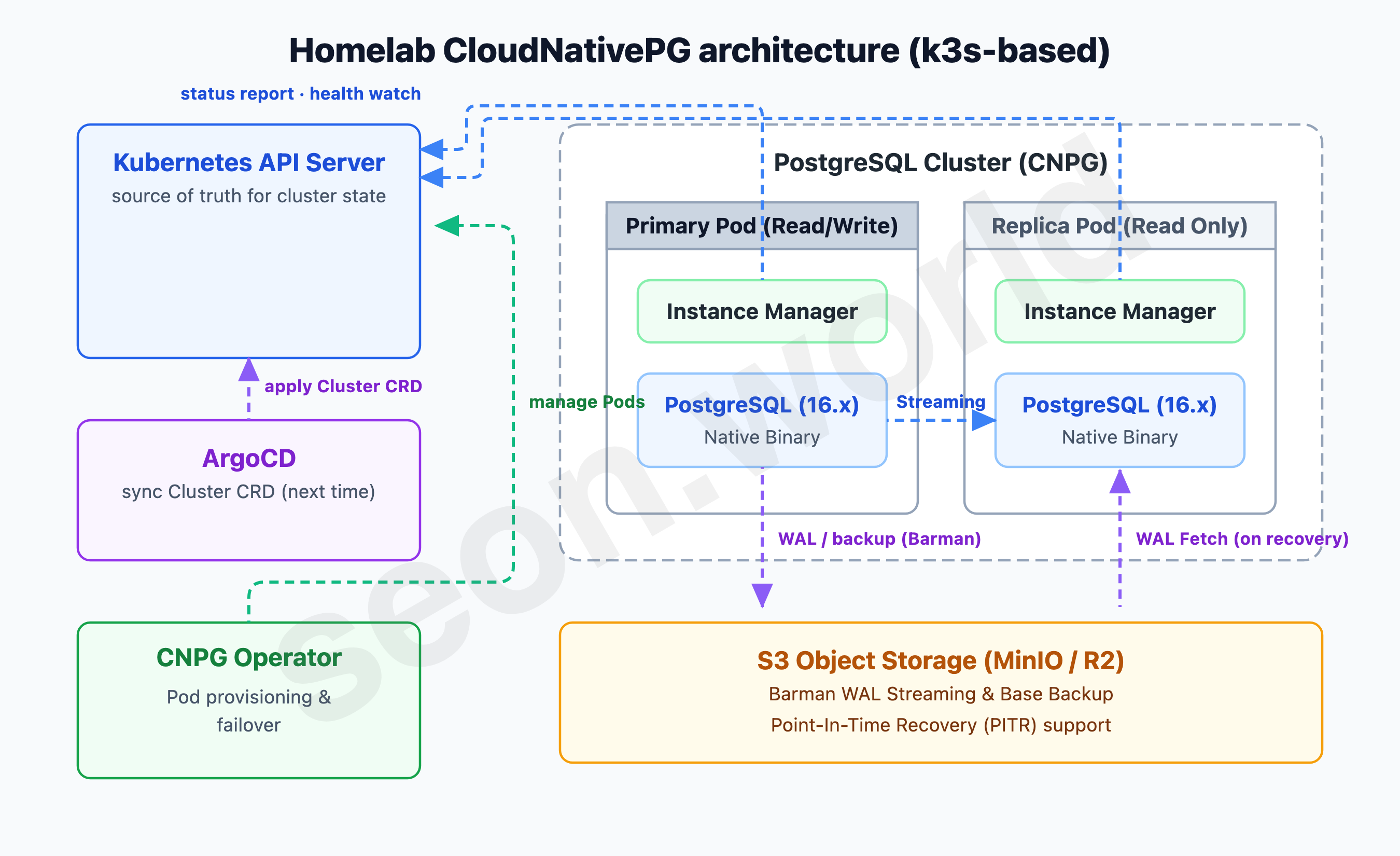
The fact that the whole cluster state fits in YAML means that definition can go straight into Git and be run declaratively. And next time I plan to GitOps the whole homelab, including this cluster, with ArgoCD — CNPG, which expresses everything as a single CRD, is the best-suited choice for that move.
A YAML on Git becomes the cluster state as-is; commit a change and ArgoCD syncs it, applying it through a zero-downtime rolling update. Having decided to bring the database inside Kubernetes, only when its definition is managed as code, too, does it stop feeling half-finished.
4. Hands-on: installing the CNPG Operator
With CNPG, you deploy the Operator once cluster-wide with Helm, and from then on you can create a Cluster in any namespace. Add the official chart repo and install into the cnpg-system namespace.
helm repo add cnpg https://cloudnative-pg.github.io/charts
helm repo update
helm upgrade --install cnpg cnpg/cloudnative-pg \
  --namespace cnpg-system \
  --create-namespace \
  --wait
The CNPG chart only ever offers “the latest point release.” To pin a specific version, add
--version <chart-version>. (This article is based on Operator v1.24.)
Once installed, check that the Operator Pod (Deployment name cnpg-controller-manager) is Running.
kubectl get pods -n cnpg-system
# NAME                                       READY   STATUS    RESTARTS   AGE
# cnpg-controller-manager-8d447b4b6-xxxxx    1/1     Running   0          40s
All CNPG operations are done through custom resources (CRDs). Check that the main CRDs are registered.
kubectl get crd | grep postgresql.cnpg.io
# backups.postgresql.cnpg.io
# clusterimagecatalogs.postgresql.cnpg.io
# clusters.postgresql.cnpg.io
# imagecatalogs.postgresql.cnpg.io
# poolers.postgresql.cnpg.io
# scheduledbackups.postgresql.cnpg.io
Finally, install the cnpg kubectl plugin you’ll use later to inspect cluster state and verify connections. With krew it’s one line.
kubectl krew install cnpg
kubectl cnpg version
# Build: {Version:1.24.1 ...}
Without krew, you can also install it via CNPG’s official install script.
The Operator and plugin are ready. Now it’s time to stand up an actual database cluster.
5. Hands-on: deploying the first highly available PostgreSQL cluster
With the Operator ready, let’s stand up a PostgreSQL cluster that actually holds data. CNPG packs the cluster’s entire state — instance count, PostgreSQL version, resources, storage — into a single Cluster CRD.
Below is the manifest (demo-db.yaml) for a 3-node HA cluster I made for verification. Since it’s for testing, resources are kept small (adjust as needed), and storage uses k3s’s default local-path.
apiVersion: postgresql.cnpg.io/v1
kind: Cluster
metadata:
  name: demo-db
  namespace: cnpg-demo
spec:
  instances: 3                       # 1 Primary + 2 Replica
  imageName: ghcr.io/cloudnative-pg/postgresql:16.4

  storage:
    size: 1Gi
    storageClass: local-path         # k3s default (WaitForFirstConsumer)

  resources:
    requests:
      memory: "256Mi"
      cpu: "100m"
    limits:
      memory: "512Mi"
      cpu: "500m"
Create the namespace and apply.
kubectl create namespace cnpg-demo
kubectl apply -f demo-db.yaml
The Operator first bootstraps the Primary with initdb, then joins the Replicas one by one. (When pulling the PostgreSQL image for the first time on a home node, the initial startup can take a few minutes.) Once the status reads Cluster in healthy state, it’s done.
kubectl get cluster demo-db -n cnpg-demo
# NAME      AGE   INSTANCES   READY   STATUS                     PRIMARY
# demo-db   24m   3           3       Cluster in healthy state   demo-db-1
The Pods consist of one Primary and two Replicas, and thanks to CNPG’s default anti-affinity, they spread across separate nodes as much as possible. In my homelab, the three Pods landed on three different Lima nodes (agent-2/3/4).
kubectl get pods -n cnpg-demo
# NAME        READY   STATUS    RESTARTS   AGE
# demo-db-1   1/1     Running   0          13m
# demo-db-2   1/1     Running   0          6m
# demo-db-3   1/1     Running   0          3m
The Operator also creates three Services for connecting. Writes always go to the Primary via *-rw, reads spread across the Replicas via *-ro, and *-r includes both the Primary and Replicas.
kubectl get svc -n cnpg-demo
# NAME         TYPE        CLUSTER-IP      PORT(S)    AGE
# demo-db-r    ClusterIP   10.43.89.62     5432/TCP   27m
# demo-db-ro   ClusterIP   10.43.198.255   5432/TCP   27m
# demo-db-rw   ClusterIP   10.43.55.136    5432/TCP   27m
6. Hands-on: verifying the connection and replication state
With the cluster up, let’s actually connect and confirm it works. On cluster creation, CNPG auto-generates an application Secret (<cluster>-app). It holds the username, DB name, password, and a ready-to-use connection URI. (Admin/superuser access is disabled by default, enabled when needed via spec.enableSuperuserAccess: true — so there’s no *-superuser Secret in the default setup.)
kubectl get secret demo-db-app -n cnpg-demo -o jsonpath='{.data.username}' | base64 -d; echo
# app
kubectl get secret demo-db-app -n cnpg-demo -o jsonpath='{.data.dbname}' | base64 -d; echo
# app
The easiest way to connect is the cnpg plugin from §4. Open a psql session straight to the Primary.
kubectl cnpg psql demo-db -n cnpg-demoIn the session, check the replication state. The Primary should be streaming WAL to the two Replicas.
postgres=# SELECT application_name, client_addr, state, sync_state
           FROM pg_stat_replication ORDER BY application_name;

 application_name | client_addr |   state   | sync_state
------------------+-------------+-----------+------------
 demo-db-2        | 10.42.3.111 | streaming | async
 demo-db-3        | 10.42.6.236 | streaming | async
(2 rows)
Both Replicas are streaming. With no Patroni and no external DCS — just the Kubernetes API and each Pod’s Instance Manager — a leader was elected and streaming replication was set up. The default replication is asynchronous (async), so write latency is negligible; if you need stronger guarantees, you can enable synchronous replication (minSyncReplicas/maxSyncReplicas) in the spec.
With that, a lightweight, simple, highly available PostgreSQL cluster is running on the homelab’s k3s. One last thing remains — how to keep this data safe: adding backups.
7. The last piece that protects your data — backups to MinIO
Even with the cluster up, without backups you’re only halfway there. When a whole node dies, or you drop a table by accident, only a base backup + WAL archive lets you roll back to a point in time (PITR).
S3-compatible API — any backend works
CNPG’s backup engine, Barman Cloud, uploads backups to object storage via the S3-compatible API. The key point here is that “S3-compatible” is a single standard interface. So the backend can be AWS S3, Google Cloud Storage, Azure Blob, Cloudflare R2, or a self-hosted MinIO — anything; you just change the endpoint and credentials in the config and it works as-is.
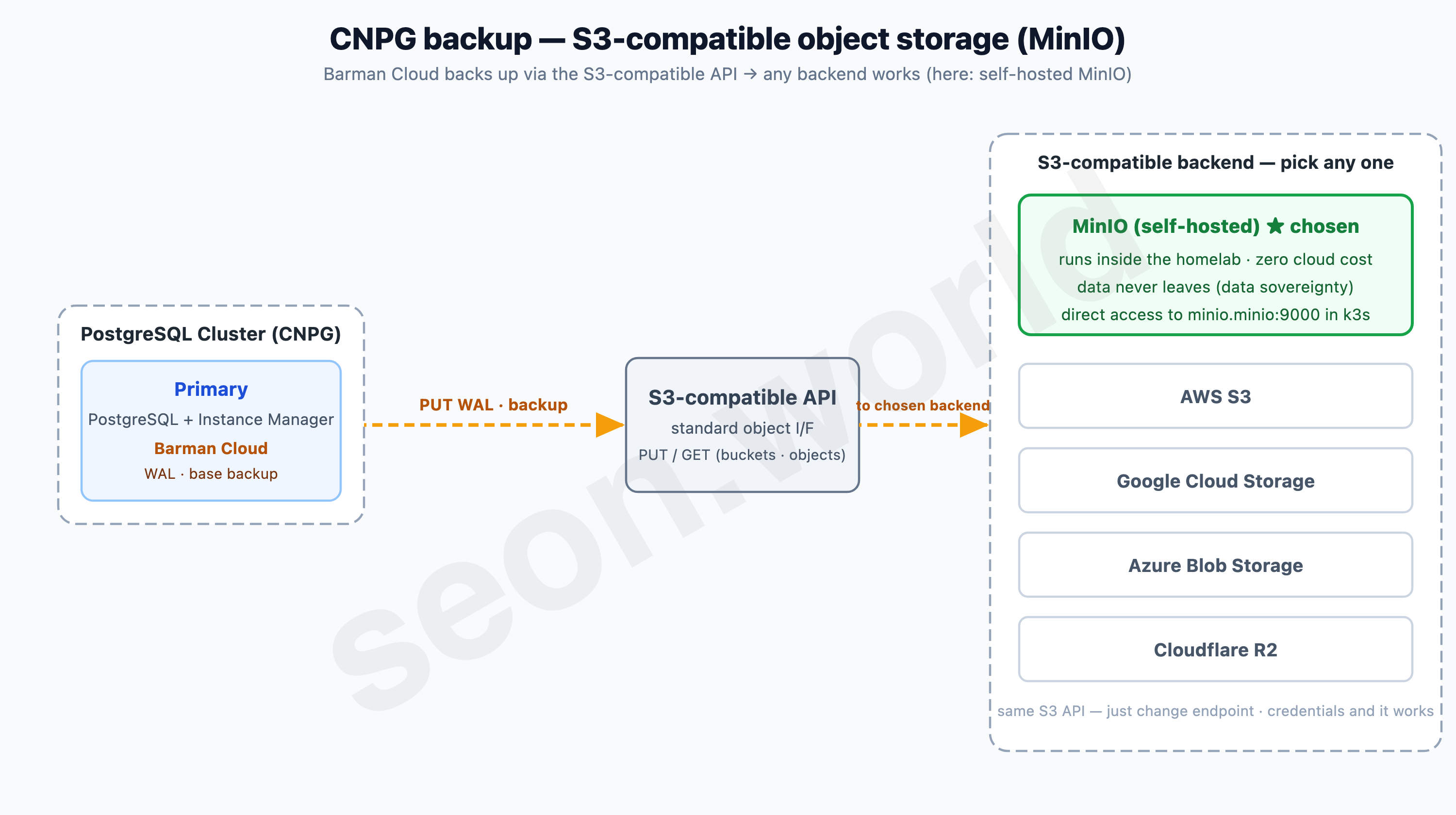
What I chose this time is MinIO. MinIO is open-source object storage that implements the S3 API directly, and you can stand it up right inside the cluster. I had three reasons for picking MinIO over a managed S3 service:
- Data sovereignty: backups never leave the homelab — not one step.
- Zero cost: no cloud storage or transfer charges.
- Simple access: it connects directly to
minio.minio:9000within the same k3s.
If I ever need off-site backups, I just change the endpoint to S3 or R2 in the same config and swap the credentials. That near-zero cost of swapping backends is the strength of S3-compatibility.
Adding the backup config
First, place the MinIO connection credentials as a Secret in the same namespace as the cluster (the key names are arbitrary; here, ACCESS_KEY/SECRET_KEY).
kubectl -n cnpg-demo create secret generic minio-backup-creds \
  --from-literal=ACCESS_KEY='<minio-access-key>' \
  --from-literal=SECRET_KEY='<minio-secret-key>'
Then add spec.backup.barmanObjectStore to the Cluster. Point it at the bucket path (destinationPath), the MinIO endpoint (endpointURL), and the Secret you just made.
spec:
  backup:
    barmanObjectStore:
      destinationPath: s3://cnpg-demo/          # MinIO bucket
      endpointURL: http://minio.minio:9000      # MinIO inside the cluster
      s3Credentials:
        accessKeyId:
          name: minio-backup-creds
          key: ACCESS_KEY
        secretAccessKey:
          name: minio-backup-creds
          key: SECRET_KEY
      wal:
        compression: gzip
Once applied, the Operator takes over PostgreSQL’s archive_command and begins continuous WAL archiving. When the cluster’s ContinuousArchiving condition turns true, it’s ready.
kubectl get cluster demo-db -n cnpg-demo \
  -o jsonpath='{.status.conditions[?(@.type=="ContinuousArchiving")].status}'; echo
# True
First backup and verification
WAL keeps flowing, but you need to take a base backup once as the reference point for recovery. A single Backup resource does it.
apiVersion: postgresql.cnpg.io/v1
kind: Backup
metadata:
  name: demo-db-backup-1
  namespace: cnpg-demo
spec:
  method: barmanObjectStore
  cluster:
    name: demo-db
kubectl apply -f backup.yaml
kubectl get backup -n cnpg-demo
# NAME CLUSTER METHOD PHASE ERROR
# demo-db-backup-1 demo-db barmanObjectStore completedcompleted. Peeking into the MinIO bucket, the base backup sits under a timestamped directory.
# inside MinIO bucket cnpg-demo
demo-db/
└── base/
    └── 20260609T094230/      # base backup (WAL accumulates under wals/ from here)
Now this cluster can — even if a node dies — roll back to any point in time using the base backup and WAL stacked in MinIO. Having brought the data inside Kubernetes, we’ve now also prepared the safety net that protects it, all in the same declarative way.
8. Wrapping up — and what’s next
I’d steer clear of spanning a CNPG cluster across nodes that sit on opposite sides of Tailscale.
CNPG is sensitive to inter-node network quality. The Primary constantly streams WAL to the Replicas, and each Pod’s Instance Manager updates its state (lease) to the Kubernetes API on a short cycle. But this homelab’s inter-node communication is a doubly encapsulated structure — flannel VXLAN layered again on top of a Tailscale (WireGuard) mesh — and the cloud (Tokyo)–home (Sapporo) leg is effectively a WAN. Placing the Primary and Replicas across that leg piles increased RTT and jitter onto a shrunken MTU, and WAL streaming breaks while leases expire. In fact, when I built a cluster spanning the Lightsail and Lima nodes, latency-driven connection drops and Pod restarts repeated endlessly.
So I strongly recommend keeping a CNPG cluster within the same low-latency leg, not crossing Tailscale. Pin the cluster to a single site (cloud nodes together, or home nodes together) with nodeSelector or affinity, and inter-node communication stays LAN-stable. If you need redundancy across sites, a per-site cluster plus an asynchronous Replica Cluster is safer than spreading a single cluster across the WAN.
Looking back, CNPG’s appeal came down to simplicity. Decide the leader with the Kubernetes API alone — no Patroni, no external DCS — and hand backups off to S3-compatible storage. Light, free (Apache 2.0, CNCF), and above all, everything from the cluster to the backup policy declared in a single YAML — that fit my 19-vCPU homelab, and what comes after it, perfectly.
And that “single YAML” is exactly the starting point for next time. This time I stood it up imperatively with helm and kubectl apply, but the cluster and its backups are, in the end, declarative manifests. Next time I’ll GitOps the whole homelab, including this cluster, with ArgoCD — moving toward the picture where a YAML on Git is the cluster state itself, and a single commit becomes a deploy.
References
- CloudNativePG — official documentation · GitHub
- Zalando Postgres Operator — GitHub · Patroni docs
- CrunchyData PGO — GitHub
- Percona Operator for PostgreSQL — GitHub
- StackGres (OnGres) — official site · GitLab
- Operator pattern (CoreOS, 2016) — Introducing Operators
- Comparing PostgreSQL Operators — Palark · simplyblock