Hands-on DevOps · Part 1
Hands-on DevOps #1 — GitLab CI/CD Components & Catalog: Build, Publish, and Consume by Version
TL;DR
- Build — Put a component under
templates/and declare its inputs withspec:inputs— types, defaults,options, even regex. Invalid values are rejected before the pipeline is even created. - Publish & consume — Push a semantic-version tag and the
releasejob publishes the component to the CI/CD Catalog; other projects pull it in withinclude: component@version. Version ranges like@1and@~latestlet you control breaking changes. - How it’s verified — Every output in this article was captured by running directly against a real gitlab.com project, SEON.N/gitlab-ci-components-catalog (public), via pipelines, releases, and the CI Lint API.
Overview
When you first set up a CI/CD pipeline, most people start by copying another project’s .gitlab-ci.yml. It works for now, but as projects multiply, the same configuration gets duplicated everywhere and three problems keep recurring.
- Discoverability — There’s no way to know whether someone has already built the same build/test/deploy job. So every team rewrites a similar pipeline from scratch.
- Reusability — You can pull in another file with
include, but there’s no versioning and no input validation. When the source file changes, the pipelines referencing it break without warning. - Contribution — There’s no standard path to safely distribute a well-built pipeline piece across the organization and announce “here it is, go use it.”
CI/CD components and the catalog exist to solve exactly these three. In one line: they turn pipeline configuration from “code you copy-paste” into “a versioned package.”
Just as you don’t copy a library’s source wholesale but pull it in by version with npm install or a Go module, components let you pull pipeline pieces in by version, like a dependency. And the CI/CD Catalog is the marketplace that gathers those components in one place so you can search and discover them.
A CI/CD component is what GitLab defines as a “reusable single pipeline configuration unit.” You pull it in with include just like before, but two things are fundamentally different.
- Typed inputs (
**spec:inputs**) — A component can declarestring/number/boolean/arraytypes, defaults,options(enum), andregexvalidation. Invalid values are rejected before the pipeline is even created. - Semantic versioning + catalog — Components are released with semantic versions and discovered in the CI/CD Catalog.
Compared with the existing include:
| Method | What it pulls in | Typed inputs | Version/Catalog |
|---|---|---|---|
include:local | a file in the same repo | No | No |
include:project | a file from another project (ref) | No | No |
include:remote | a file at a URL | No | No |
include:template | a GitLab-provided template | No | No |
**include:component** | a component (spec + job) | Yes | Yes (Catalog) |
In one line: where include:local/include:project/include:remote “copy a file as-is,” include:component “pulls in a dependency with an explicit version and input contract (spec).” The key difference is that you’re pulling in not a plain file but a building block with a guaranteed input spec and version.
CI/CD components and the CI/CD Catalog reached GA in GitLab 17.0 (2024-05-16); before that they were experimental/beta. This article uses GitLab.com (always the latest version).
Where it’s useful
Components shine when “you repeat the same thing across many projects.” Common real-world use cases:
| In this situation | Solve it with a component |
|---|---|
| Apply the same security scan or lint to every repository | Build a scan component once and put it in the catalog; each project gets the same checks with a few lines of include |
| Standardize a deploy routine (Cloud Run, Kubernetes, etc.) | Take the environment name and image tag as inputs, and reuse the same component across teams by changing only the values |
| A platform team wants to enforce a company-standard pipeline | Gather components at the group level and offer them as a catalog — you get governance (enforcement) and DRY (de-duplication) at the same time |
| Control breaking changes, like a library upgrade | Consumers pin a partial version like @1 to auto-accept only non-breaking updates, or pin an exact version |
The flagship example GitLab cited at GA was a Google Cloud Run deploy component, and the most common adoption driver is turning “jobs every team repeats the same way” — security scan, build, lint, deploy — into shared, organization-wide building blocks.
Version history and direction
Components and the catalog haven’t stood still since they went GA in 17.0. GitLab keeps adding to this area with each quarterly release.
| Version | What was added/changed |
|---|---|
| Beta (2023-12) | CI/CD Catalog beta released |
| 17.0 (2024-05) | Components + catalog reach full GA |
| 18.0 | The release job’s standard image moved from release-cli to glab; release-cli is deprecated, removal planned for 20.0 (until then it falls back automatically when glab is absent) |
| 18.5 | Per-project component limit raised 30 → 100 |
| 18.6–18.7 | Component context expression — a component can access its own metadata such as name and version |
| 18.9 | Catalog resource usage analytics introduced |
| 19.0 (2026-05) | Detailed component usage for maintainers — track which project uses which version |
The direction is clear: the core syntax (spec:inputs, semantic versioning, release, the catalog) has stayed stable since GA, while operational conveniences (usage analytics, usage detail, context expressions) and raised limits keep being layered on top.
So it’s a stable foundation you learn once and use for a long time, and at the same time an area GitLab actively expands every quarter. This article’s hands-on was run on gitlab.com (always latest), so the captured behavior already reflects the newest version.
The availability range is broad too. Components, the catalog, and spec:inputs all work across:
- Tier: Free · Premium · Ultimate — all tiers
- Offering: GitLab.com (SaaS) · GitLab Self-Managed · GitLab Dedicated — all offerings
Even on the free tier or self-managed, the core actions — build, publish, and consume components — work as-is. Just remember two things. First, 19.0’s “detailed component usage” is Premium-and-up only. Second, a self-managed instance’s catalog starts with zero published components, so you fill it by publishing your own or mirroring from GitLab.com, and the instance must be on 17.0 or later.
Architecture
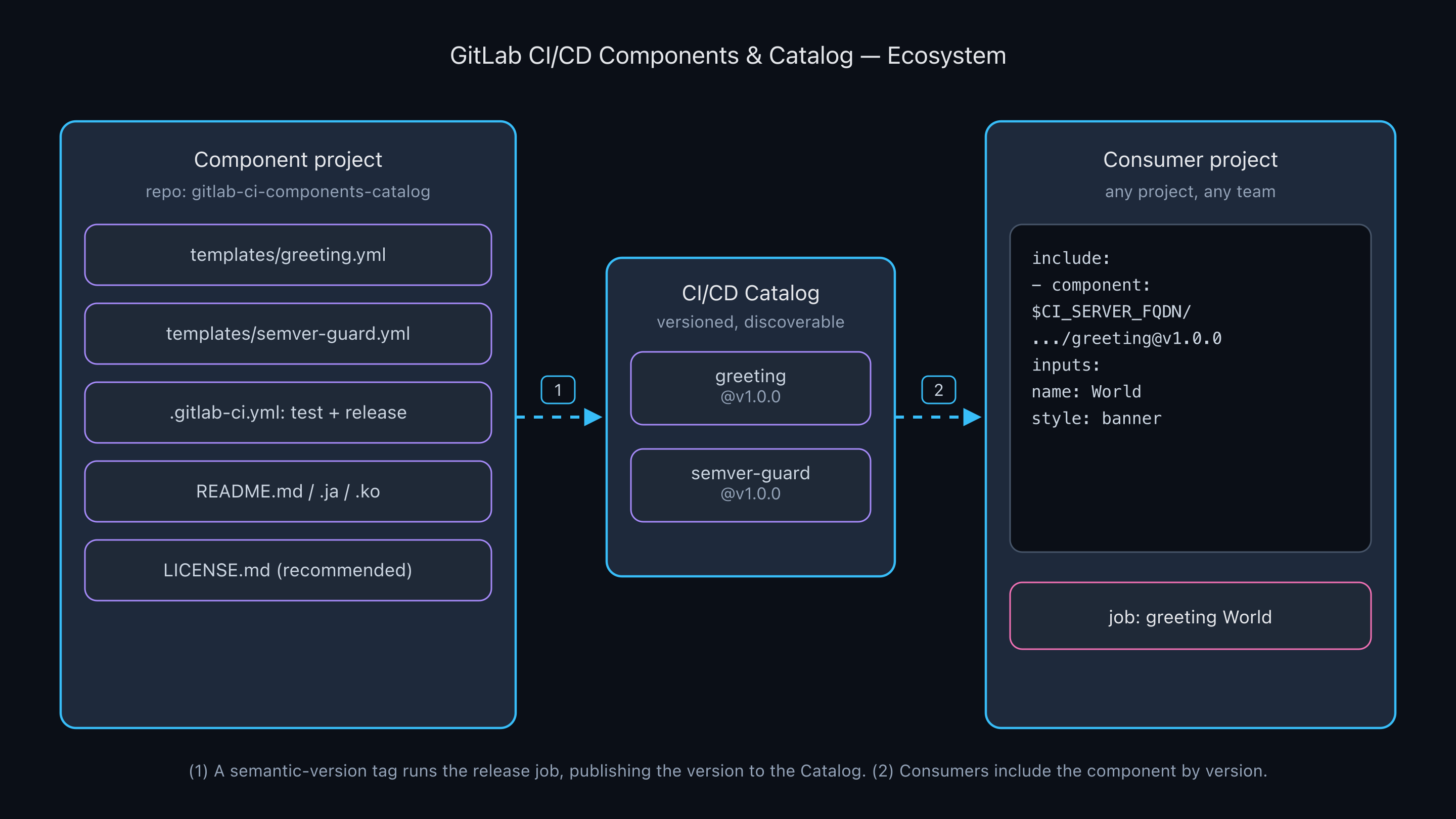
The component project (templates/*.yml + .gitlab-ci.yml + README/LICENSE) publishes versions to the catalog via release, and any consumer project pulls them in with include: component@version.
Lifecycle
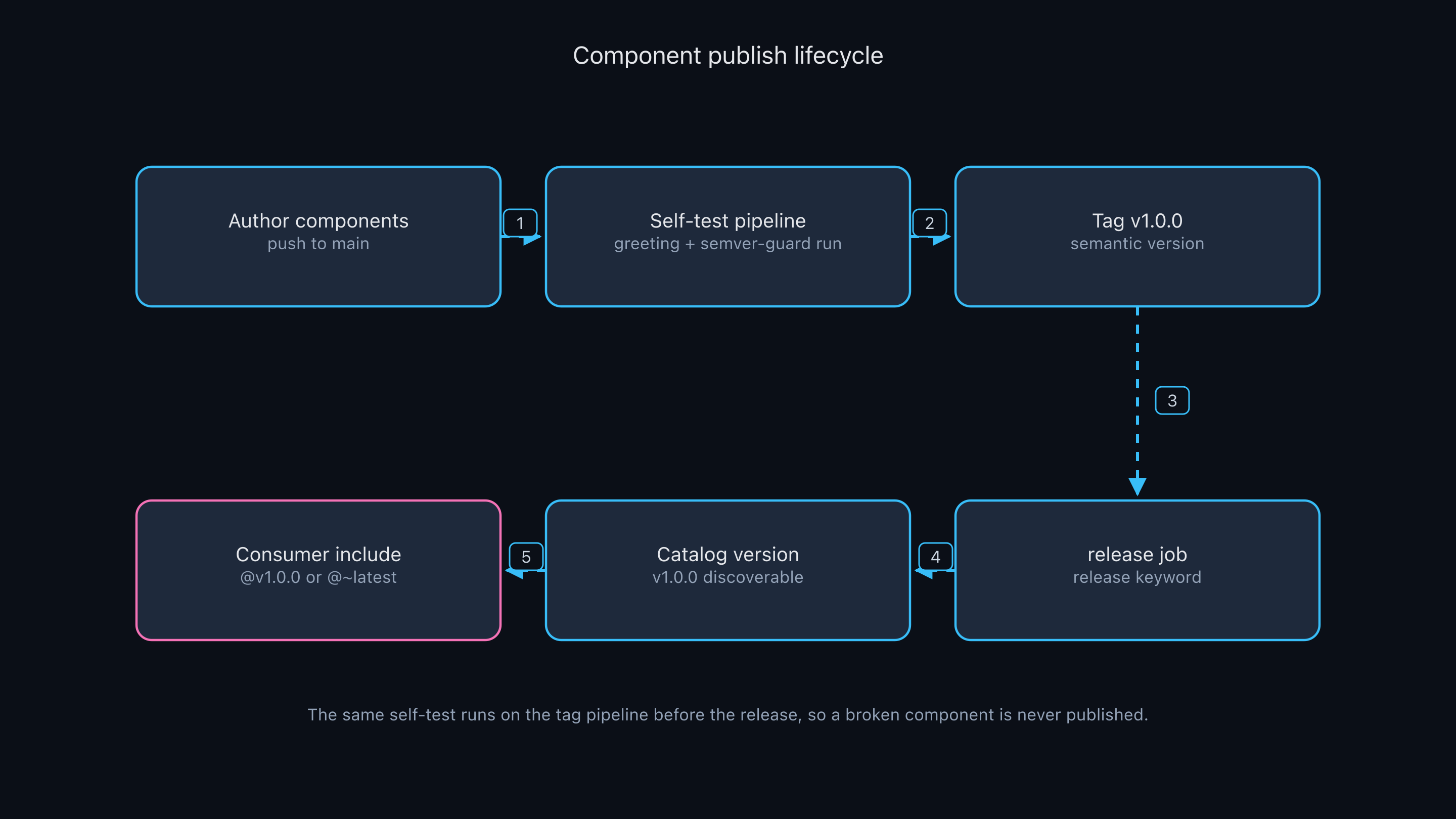
(1) Write the component and push to main → (2) the self-test pipeline actually runs the component → (3) tag a semantic version → (4) the release job publishes → (5) the version is registered in the catalog → (6) consumers include it. Because self-test runs first even on the tag pipeline, a broken component never gets published.
include resolution and input validation
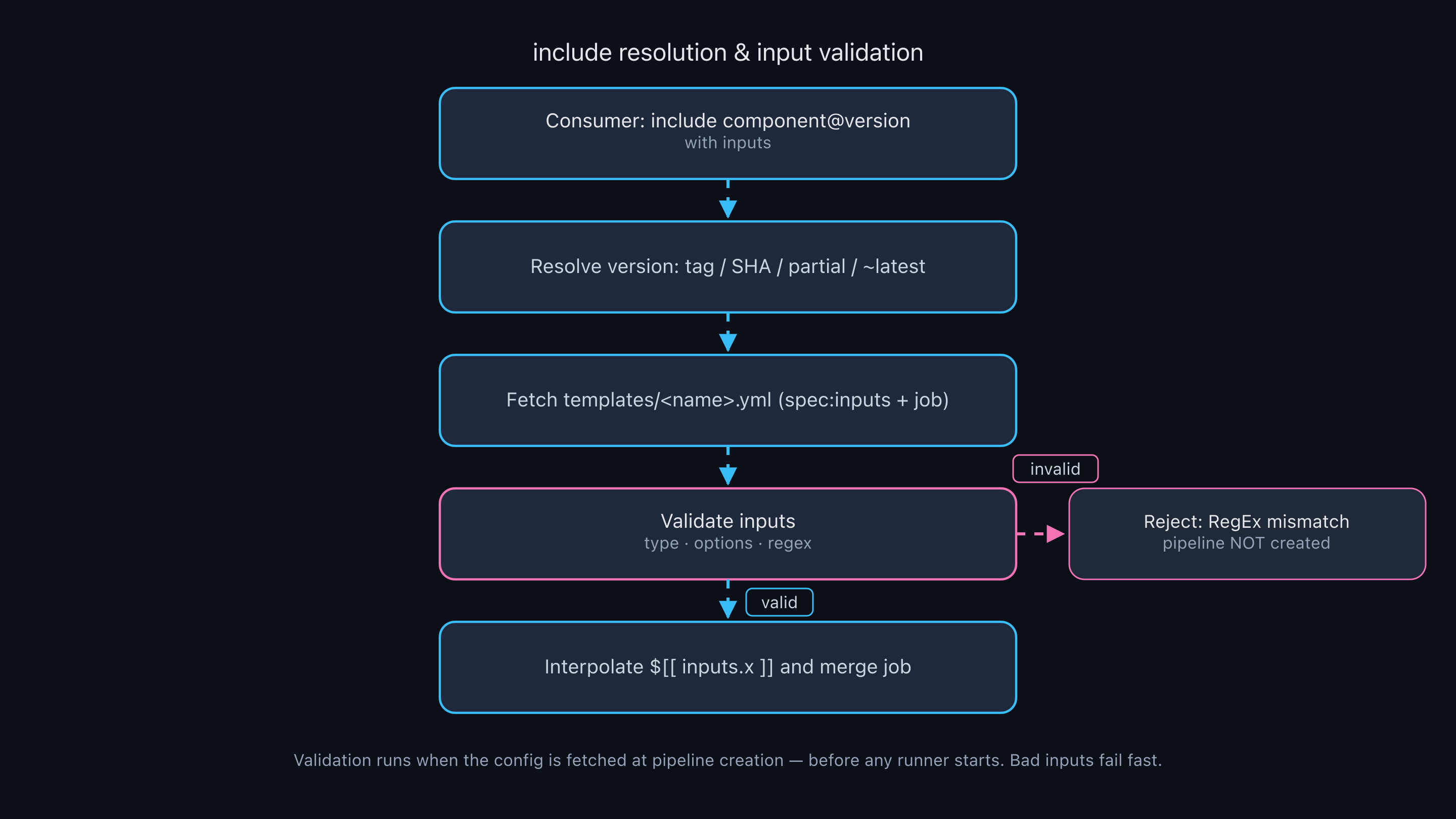
include: component@version is resolved at pipeline creation time: version resolution (tag/SHA/partial/~latest) → fetch the template → input validation (type/options/regex) → $[[ inputs.x ]] interpolation → merge the job. If it’s blocked at validation, the pipeline fails before a runner ever spins up.
Prerequisites
This hands-on uses only local glab, git, curl, and python3. Use an already-installed, authenticated glab; if you don’t have it, install it per the table below (to use it as a container, docker run the registry.gitlab.com/gitlab-org/cli image).
| Tool | Version | macOS | Windows | Linux |
|---|---|---|---|---|
| GitLab | 17.0+ | — (SaaS) | — | — |
glab | 1.40+ | brew install glab | winget install glab.glab | package manager, or docker run --rm -it registry.gitlab.com/gitlab-org/cli:latest |
git | 2.30+ | preinstalled | preinstalled / winget install Git.Git | preinstalled / distro package |
curl | 7.x+ | preinstalled | preinstalled | preinstalled |
| Token | — | a PAT with api + write_repository scope, or glab auth login | same | same |
| Runner | — | enable a shared/group runner on the project (to run pipelines) | same | same |
glab/git/curluse the same commands regardless of OS. The commands below are identical across all three; only differences are noted separately.
Core concepts
1) Component directory structure
A component project places components under a top-level templates/ directory.
├── templates/
│   ├── greeting.yml          # single-file component
│   └── my-other/             # directory-form component
│       └── template.yml      # only this file is published
├── LICENSE.md
├── README.md
└── .gitlab-ci.yml
A single file is templates/<name>.yml; a more complex component is templates/<name>/template.yml. In the directory form, only template.yml is published — the rest (build/test helpers) are not.
2) spec:inputs — typed inputs
A component file is split into two YAML documents. Above --- is the spec (input declarations); below it is the actual job definition.
spec:
  inputs:
    stage:
      type: string      # string (default) / number / boolean / array
      default: test      # with a default it's optional; without one it's required
    style:
      options: [plain, banner]   # allowed-value whitelist (enum)
    version:
      regex: ^v?\d+\.\d+\.\d+$    # regex validation (RE2)
---
# interpolate with $[[ inputs.NAME ]] in the job definition
The key is the “why.” Input validation happens at pipeline creation time (when the configuration is fetched). So invalid input is rejected before a runner ever spins up, saving cost and time. A pipeline can take up to 20 inputs.
3) Interpolation $[[ inputs.x ]]
Unlike the CI variable $VAR, input interpolation uses the $[[ inputs.name ]] syntax. It works in the job name, in scripts, and on array elements $[[ inputs.arr[0] ]]. Interpolation is evaluated once at config-fetch time and stays fixed for the whole pipeline.
4) Version references
Components are referenced in this priority order:
- Commit SHA —
@e3262fdd... - Tag —
@v1.0.0(catalog publishing requires a semantic-version tag) - Branch —
@main - Partial version / latest —
@1.2,@1,@~latest
~latestpoints to the latest released version (excluding pre-releases), so breaking changes can flow in automatically. In production, prefer a pinned version or a partial version like@1.
5) include path and release
include:
  - component: $CI_SERVER_FQDN/<project-path>/<component-name>@<version>
$CI_SERVER_FQDN is a predefined variable for the GitLab host FQDN, so the same config works across instances. And for a version to appear in the catalog, you must create the release with the **release** keyword (not the Releases API).
Hands-on steps
Step 1 — Create the project and clone
This step creates the empty project (the container) that will hold the components. To publish to the catalog, a project needs a description, a README, and components under templates/, so we prepare that frame first. There are no components yet — we just take the empty repo and set up the working directory.
We created it with a description via the API for clarity (the catalog requires a description). glab repo create works too.
# Get the token from glab config, or export a PAT directly
GITLAB_TOKEN=$(glab config get token --host gitlab.com)
REPO_NAME="gitlab-ci-components-catalog"
DESC="Reusable GitLab CI/CD components (greeting, semver-guard) published to the CI/CD Catalog. Hands-on samples."

# Create via API (or: glab repo create "SEON.N/${REPO_NAME}" --public --description "${DESC}")
curl -s --request POST --header "PRIVATE-TOKEN: ${GITLAB_TOKEN}" \
  --header "Content-Type: application/json" \
  --data "{\"name\":\"${REPO_NAME}\",\"path\":\"${REPO_NAME}\",\"namespace_id\":<your-namespace-id>,\"visibility\":\"public\",\"description\":\"${DESC}\"}" \
  "https://gitlab.com/api/v4/projects"

git clone "https://oauth2:${GITLAB_TOKEN}@gitlab.com/SEON.N/${REPO_NAME}.git" "/tmp/${REPO_NAME}"
cd "/tmp/${REPO_NAME}"
git symbolic-ref HEAD refs/heads/main
mkdir -p templates
Output
created: SEON.N/gitlab-ci-components-catalog | id 83321559 | vis public
Cloning into '/tmp/gitlab-ci-components-catalog'...
warning: You appear to have cloned an empty repository.
Note: A service account or CI environment may not have an SSH key, so do git push in the
https://oauth2:${GITLAB_TOKEN}@...form. The token needsapi(create) andwrite_repository(push) scope.
Step 2 — The greeting component (4 inputs + interpolation)
This step writes the first component. To show the two essentials — typed inputs and interpolation — at once, we build greeting, which takes four inputs and injects them into the job name and the script. It’s the smallest example of a component whose behavior changes with its inputs.
templates/greeting.yml. It uses string/boolean/options/default, and interpolates into the job name and the script.
spec:
  inputs:
    stage:
      type: string
      default: test
    name:
      type: string
      description: "Who to greet. Required: no default."
    style:
      type: string
      default: plain
      options: [plain, banner]
    shout:
      type: boolean
      default: false
---
"greeting $[[ inputs.name ]]":          # interpolated into the job name too
  stage: $[[ inputs.stage ]]
  image: alpine:3.20
  variables:
    GREET_NAME: "$[[ inputs.name ]]"
    GREET_STYLE: "$[[ inputs.style ]]"
    GREET_SHOUT: "$[[ inputs.shout ]]"
  script:
    - |
      MSG="Hello, ${GREET_NAME}!"
      if [ "${GREET_SHOUT}" = "true" ]; then
        MSG="$(echo "${MSG}" | tr '[:lower:]' '[:upper:]')"
      fi
      if [ "${GREET_STYLE}" = "banner" ]; then
        LINE="$(echo "${MSG}" | sed 's/./=/g')"
        printf '%s\n%s\n%s\n' "${LINE}" "${MSG}" "${LINE}"
      else
        echo "${MSG}"
      fi
File: templates/greeting.yml
Note: Write multi-line scripts as a
- |block scalar. If you write- echo "OK: ...", the:(colon+space) inside a YAML plain scalar is parsed as a mapping separator and causes a parse error (see Troubleshooting below).
Step 3 — The semver-guard component (regex) + .gitlab-ci.yml
This step builds a second component to show input validation (regex), and at the same time wires up .gitlab-ci.yml so the project self-tests its own components and releases from a tag. You assemble the component and the “publishing pipeline skeleton” together.
templates/semver-guard.yml validates its input with a regex.
spec:
  inputs:
    stage:
      type: string
      default: test
    version:
      type: string
      regex: ^v?\d+\.\d+\.\d+$
---
semver-guard:
  stage: $[[ inputs.stage ]]
  image: alpine:3.20
  variables:
    INPUT_VERSION: "$[[ inputs.version ]]"
  script:
    - |
      set -e
      echo "Validating version '${INPUT_VERSION}'"
      echo "${INPUT_VERSION}" | grep -Eq '^v?[0-9]+\.[0-9]+\.[0-9]+$'
      echo "OK - '${INPUT_VERSION}' is a valid semantic version"
The project’s own .gitlab-ci.yml (a) self-tests the components at the current SHA, and (b) creates a release from a tag.
stages: [test, release]

include:
  - component: $CI_SERVER_FQDN/$CI_PROJECT_PATH/greeting@$CI_COMMIT_SHA
    inputs:
      name: GitLab
      style: banner
      shout: true
  - component: $CI_SERVER_FQDN/$CI_PROJECT_PATH/semver-guard@$CI_COMMIT_SHA
    inputs:
      version: v1.0.0

create-release:
  stage: release
  image: registry.gitlab.com/gitlab-org/cli:latest
  rules:
    - if: $CI_COMMIT_TAG
  script:
    - echo "Creating release for tag $CI_COMMIT_TAG"
  release:
    tag_name: $CI_COMMIT_TAG
    description: "Release $CI_COMMIT_TAG of the components."
File: .gitlab-ci.yml
Note: Using
@$CI_COMMIT_SHAin the self-test pulls in exactly the components in the commit you just pushed, at that point in time — the “test yourself in your own pipeline” pattern. Before pushing, we validated the YAML syntax locally.
python3 - <<'PY'
import yaml
for f in ["templates/greeting.yml","templates/semver-guard.yml",".gitlab-ci.yml"]:
    print("OK", f, len(list(yaml.safe_load_all(open(f)))), "doc")
PY
# OK templates/greeting.yml 2 doc
# OK templates/semver-guard.yml 2 doc
# OK .gitlab-ci.yml 1 doc
Step 4 — Push and run the self-test pipeline (real output)
This step checks the component you wrote actually runs. Pushing to main triggers the self-test pipeline, which runs the component you just made exactly as it is in that commit. It’s the gate that filters out broken components before publishing.
git add .
git commit -m "Add greeting and semver-guard reusable CI/CD components"
git push -u origin main
# pushing to main triggers the self-test pipeline
Check the pipeline and job status via the API.
PID=83321559
curl -s --header "PRIVATE-TOKEN: ${GITLAB_TOKEN}" \
  "https://gitlab.com/api/v4/projects/${PID}/pipelines?per_page=1"
Real output (job list)
14845634397 | semver-guard     | test | success | 8.4 s
14845634396 | greeting GitLab  | test | success | 10.3 s
Notice the job is named greeting GitLab — the interpolation of "greeting $[[ inputs.name ]]" worked. The job logs (trace) look like this.
Real output (greeting job trace)
$ MSG="Hello, ${GREET_NAME}!" # collapsed multi-line command
==============
HELLO, GITLAB!
==============
Real output (semver-guard job trace)
$ set -e # collapsed multi-line command
Validating version 'v1.0.0'
OK - 'v1.0.0' is a valid semantic version
Note: Both
style: banner(banner output) andshout: true(uppercasing) took effect, soHELLO, GITLAB!printed in a box. You can also see thebooleaninput interpolated into the script as the string"true".
Step 5 — Register the catalog resource + publish the version (real output)
This step puts the verified component in the catalog so it can be “consumed by version.” First mark the project as a catalog resource, then push a semantic-version tag so the release job publishes that version to the catalog. From here, other projects can search for and use it.
Mark the project as a “catalog resource.” In the UI it’s the “CI/CD Catalog project” toggle under Settings > General > Visibility, but for automation use the GraphQL catalogResourcesCreate (no REST yet, issue 463043).
curl -s --request POST "https://gitlab.com/api/graphql" \
  --header "Authorization: Bearer ${GITLAB_TOKEN}" \
  --header "Content-Type: application/json" \
  --data '{"query":"mutation { catalogResourcesCreate(input: { projectPath: \"SEON.N/gitlab-ci-components-catalog\" }) { errors } }"}'
# => {"data":{"catalogResourcesCreate":{"errors":[]}}}
Now pushing a semantic-version tag runs the tag pipeline: self-test, then the release job.
git tag v1.0.0
git push origin v1.0.0
Real output (tag pipeline jobs)
14845637416 | create-release   | release | success
14845637415 | semver-guard     | test    | success
14845637414 | greeting GitLab  | test    | success
Real output (create-release job trace)
$ echo "Creating release for tag $CI_COMMIT_TAG"
Creating release for tag v1.0.0
• Creating or updating release  repo=SEON.N/gitlab-ci-components-catalog tag=v1.0.0
✓ Release created:	url=https://gitlab.com/SEON.N/gitlab-ci-components-catalog/-/releases/v1.0.0
✓ Release succeeded after 0.77 seconds.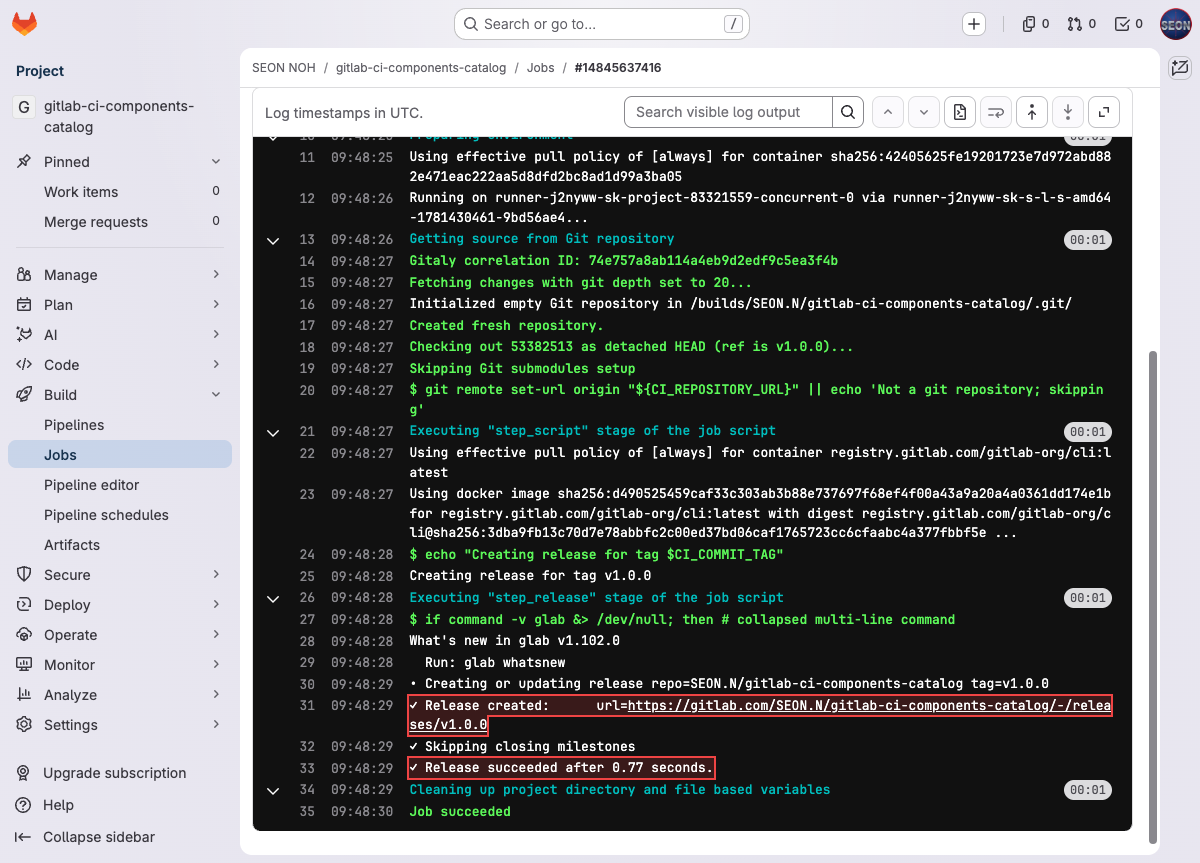
Check that the version was registered in the catalog via GraphQL.
curl -s --request POST "https://gitlab.com/api/graphql" \
  --header "Authorization: Bearer ${GITLAB_TOKEN}" --header "Content-Type: application/json" \
  --data '{"query":"{ ciCatalogResource(fullPath: \"SEON.N/gitlab-ci-components-catalog\") { name webPath versions { count nodes { name } } } }"}'
Output
{"data":{"ciCatalogResource":{"name":"gitlab-ci-components-catalog",
  "webPath":"/SEON.N/gitlab-ci-components-catalog",
  "versions":{"count":1,"nodes":[{"name":"v1.0.0"}]}}}}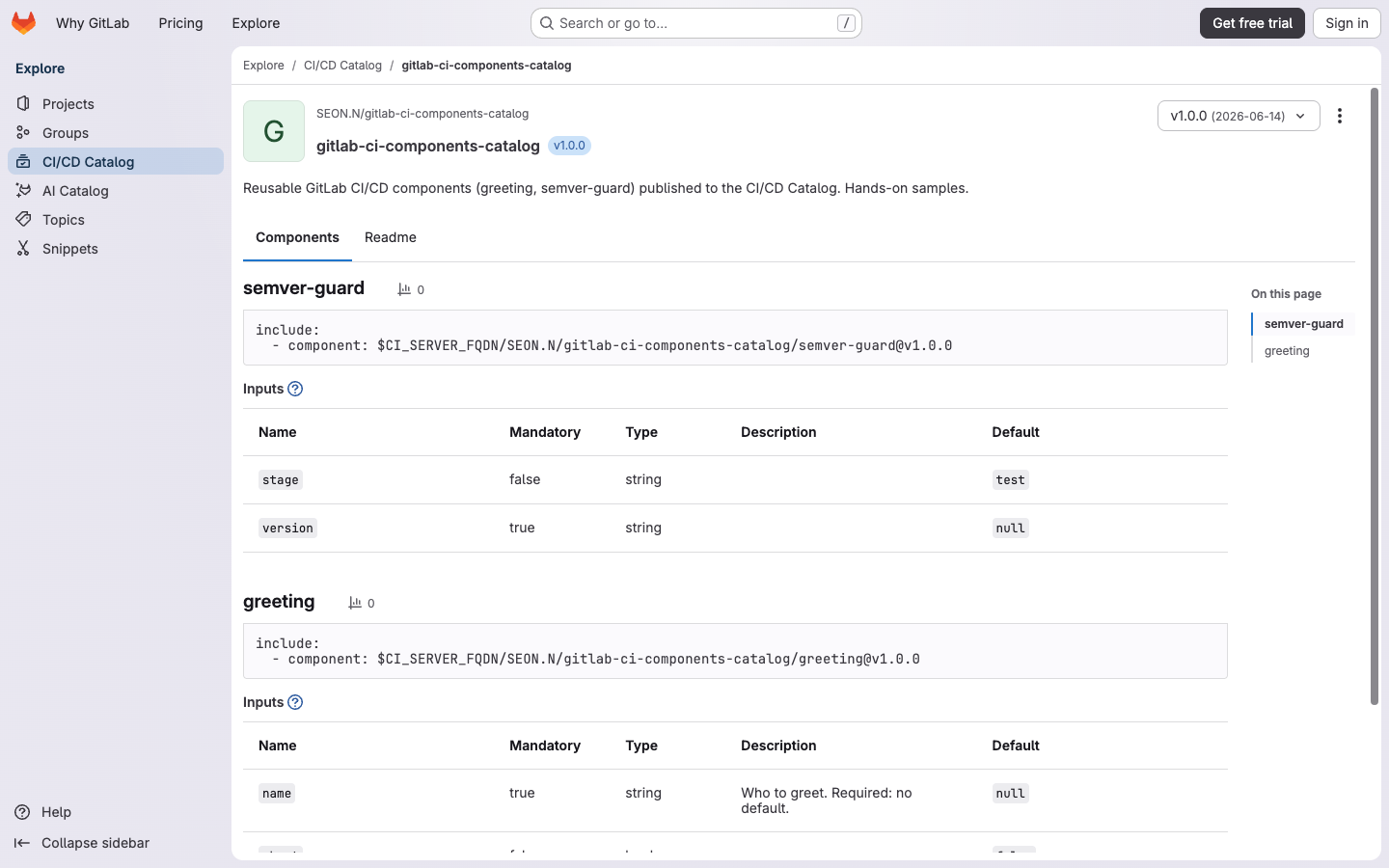
Note: The image the
releasejob uses is, per the current official docs,registry.gitlab.com/gitlab-org/cli(glab) — changed from the formerrelease-cli. Pushing only a tag without thereleasekeyword does not create a version in the catalog.
Step 6 — Verify consumer include (CI Lint API, real output)
This step checks whether another project can actually consume the published version. Without spinning up a runner, the CI Lint API alone confirms that version references and input validation behave as intended.
We verify with the CI Lint API (POST /projects/:id/ci/lint) whether another project can pull in the published version. include resolution and input validation are confirmed without a runner.
PID=83321559
curl -s --request POST --header "PRIVATE-TOKEN: ${GITLAB_TOKEN}" \
  --header "Content-Type: application/json" \
  --data '{"include_jobs":true,"content":"stages: [test]\ninclude:\n  - component: gitlab.com/SEON.N/gitlab-ci-components-catalog/greeting@v1.0.0\n    inputs:\n      name: World\n      style: plain"}' \
  "https://gitlab.com/api/v4/projects/${PID}/ci/lint"
Output (three version references)
ref @v1.0.0     -> valid=True  jobs=['greeting World']  errors=[]
ref @~latest    -> valid=True  jobs=['greeting World']  errors=[]
ref @1.0.0      -> valid=False errors=["Component '.../greeting@1.0.0' - content not found"]
Since the tag is v1.0.0, the include must also be @v1.0.0 (or @~latest). @1.0.0 (no v prefix) differs from the tag name, so it returns “content not found.” Next, validate semver-guard’s regex input.
Real output (regex input pass/reject)
=== valid version v2.3.4 (regex pass) ===
valid: True | jobs: ['semver-guard'] | errors: []

=== invalid version 'not-a-version' (regex reject) ===
valid: False | errors: ['`.../semver-guard@v1.0.0`: `version` input: provided value does not match required RegEx pattern']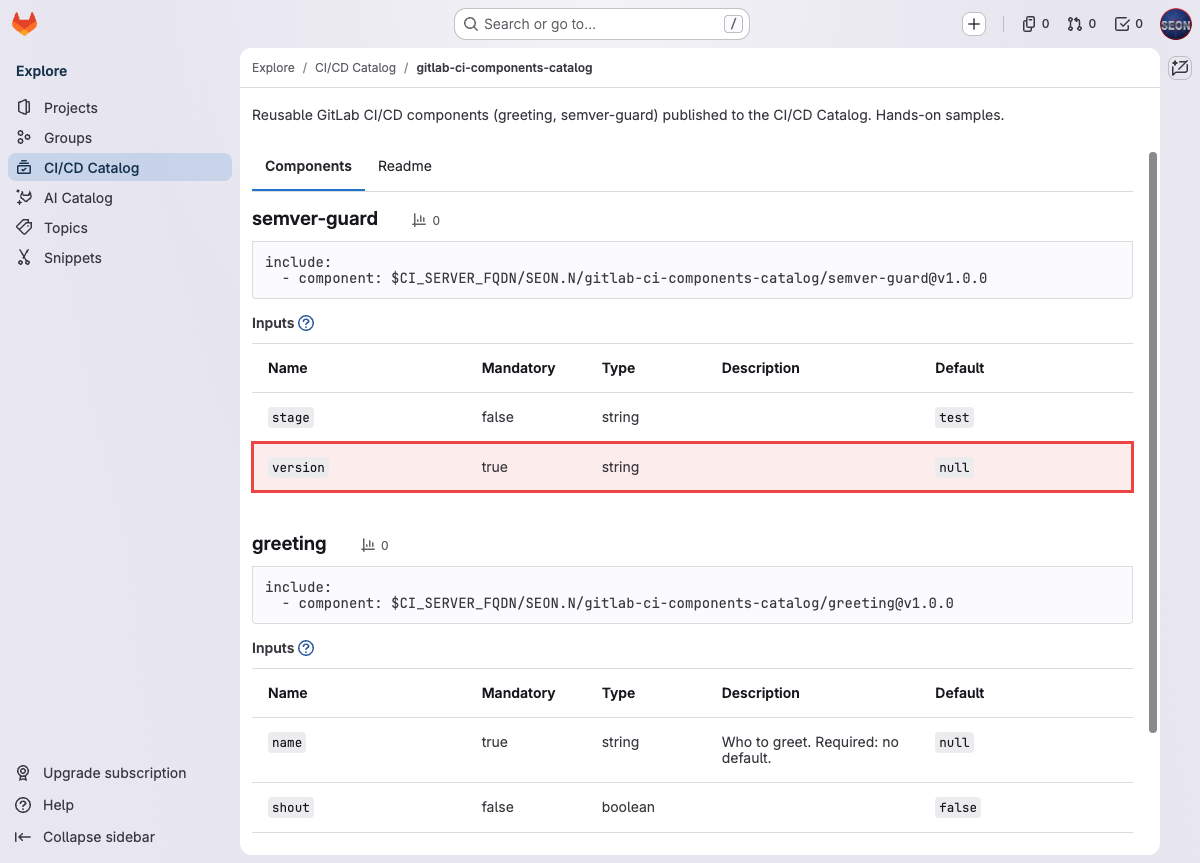
Note: An invalid version string is blocked by regex validation at the pipeline-creation stage, before the job ever runs. This is the core value of a component’s typed/regex inputs.
Advanced hands-on
The basic loop — build the components (Steps 1–3), verify with self-test (Step 4), publish to the catalog (Step 5), confirm a consumer can pull them in (Step 6) — ends here. Below are advanced patterns common in practice: real consumption from another project, controlling breaking changes with version ranges, and composing multiple components.
Step 7 — Actually consume from a consumer project (usage)
The point of the catalog is consuming a component with include from another project, not the one that built it. So we created a separate consumer project (public) and actually pulled it in.
The consumer project’s .gitlab-ci.yml only needs to pull the components in by version.
stages: [test]

include:
  - component: $CI_SERVER_FQDN/<your-namespace>/gitlab-ci-components-catalog/greeting@v1.0.0
    inputs:
      name: Consumer
      style: banner
  - component: $CI_SERVER_FQDN/<your-namespace>/gitlab-ci-components-catalog/semver-guard@v1.0.0
    inputs:
      version: v3.1.4
Real output (consumer pipeline jobs)
greeting Consumer | test | success
semver-guard      | test | success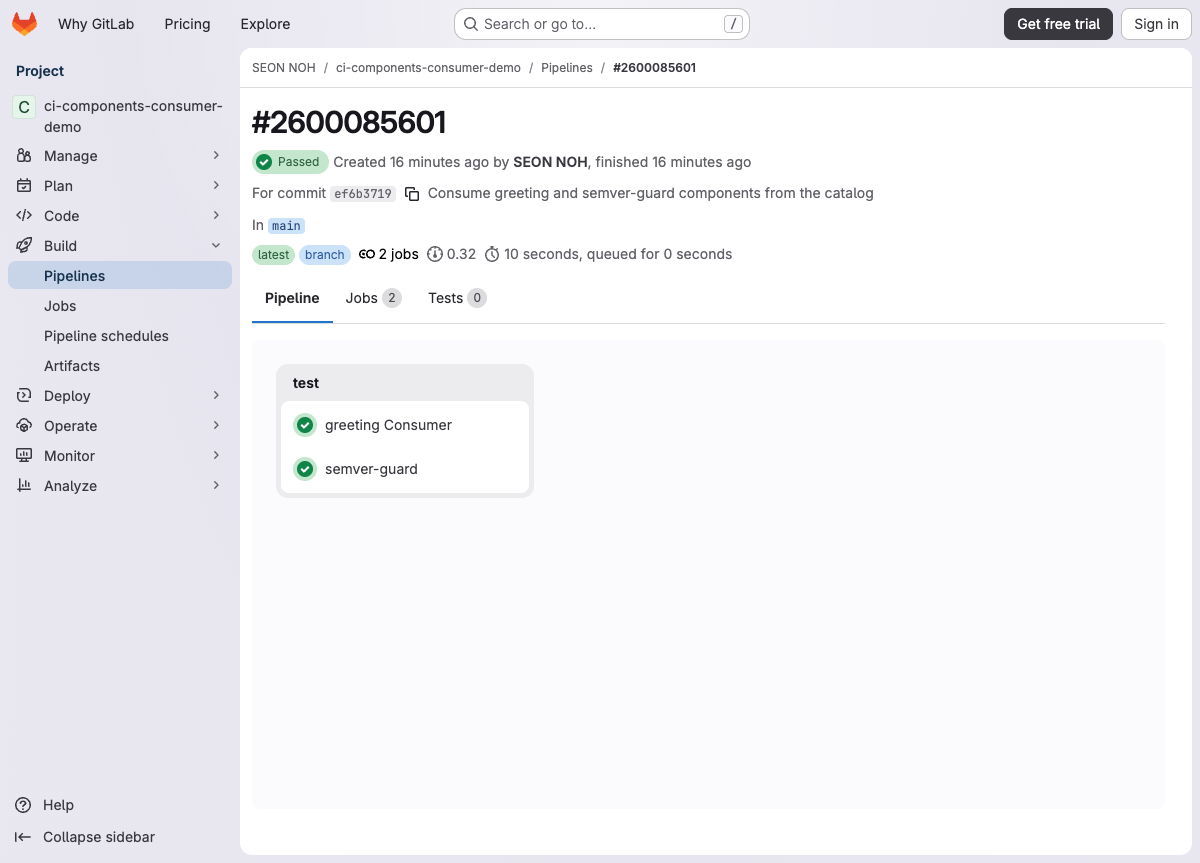
The job named greeting Consumer confirms the interpolation worked with the consumer’s input (name: Consumer). In other words, once a component is published, any project pulls it in with its own inputs.
Note: The catalog aggregates a per-component usage count. Query it via GraphQL.
glab api graphql -f query='{ ciCatalogResource(fullPath:"<group>/<project>"){ versions{ nodes{ name components{ nodes{ name last30DayUsageCount } } } } } }'However,
last30DayUsageCountis not reflected immediately after consumption (in our test it was still 0 on a same-day re-query). Check usage after the aggregation has refreshed.
Step 8 — v2.0.0 release and version ranges (controlling breaking changes)
Signal a breaking change with a MAJOR bump. We changed greeting’s default style from plain to banner (a change that alters existing consumers’ default output) and released v2.0.0.
# templates/greeting.yml: change style default from plain to banner (breaking)
git commit -am "greeting v2.0.0: change default style to banner (breaking change)"
git tag v2.0.0
git push origin main v2.0.0
Once the tag pipeline passes self-test and then release, two versions coexist in the catalog.
Real output (catalog versions)
{"versions":{"count":2,"nodes":[{"name":"v2.0.0"},{"name":"v1.0.0"}]}}Now the version a consumer pulls in depends on which reference it uses. We verified with CI Lint.
Real output (version reference resolution)
@v1.0.0  -> valid     exact tag
@v2.0.0  -> valid     exact tag
@1       -> valid     latest in the 1.x range = v1.0.0
@2       -> valid     latest in the 2.x range = v2.0.0
@~latest -> valid     latest released (pre-releases excluded) = v2.0.0
@1.0.0   -> invalid   content not found (the tag is v1.0.0)
What matters is the operational strategy. Even when the breaking v2.0.0 ships, a consumer pinned to @1 keeps receiving 1.x and stays safe. A consumer on @~latest, however, automatically gets v2.0.0 and its behavior changes (here, the default output becomes banner). So production pipelines should use a partial version like @1 or a pinned version, and avoid @~latest.
Step 9 — Composing components (multiple components in one pipeline)
The real power of components is “assembly”: bundling several single-purpose components as stages into a standard pipeline. Here we add one more component, lint, and compose the self-test as a lint → test flow.
templates/lint.yml:
spec:
  inputs:
    stage:
      type: string
      default: lint
---
component-lint:
  stage: $[[ inputs.stage ]]
  image: alpine:3.20
  script:
    - |
      echo "Linting component templates..."
      for f in templates/*.yml; do echo "checking ${f}"; done
      echo "OK - lint passed"
The .gitlab-ci.yml sets stages to [lint, test, release] and adds lint (the lint stage) before the existing greeting/semver-guard (test).
stages: [lint, test, release]

include:
  - component: $CI_SERVER_FQDN/$CI_PROJECT_PATH/lint@$CI_COMMIT_SHA
    inputs:
      stage: lint
  # greeting and semver-guard are the same as Step 3 (test stage)
Real output (pipeline graph)
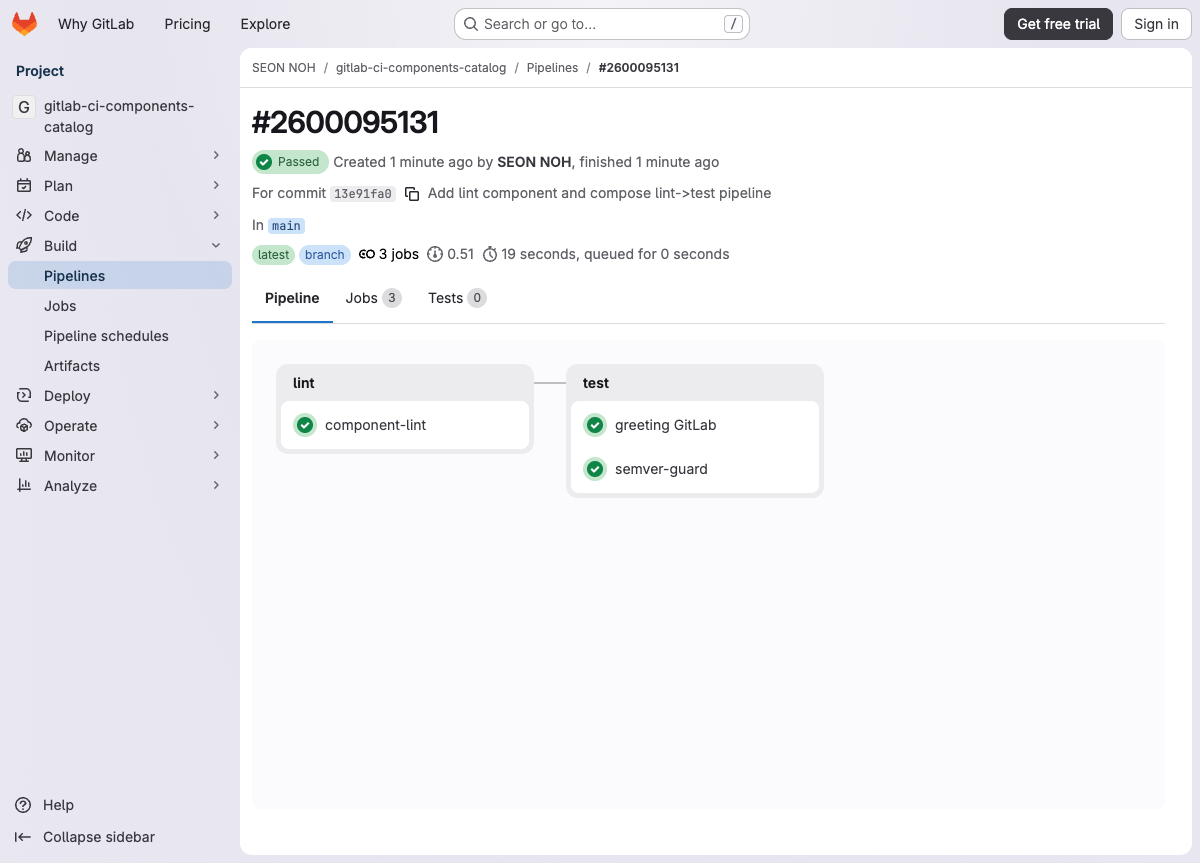
The lint stage’s component-lint must pass first, then the test stage’s greeting/semver-guard run. Each component is versioned and published independently, but the consumer composes them as stages into a single standard pipeline — this is the heart of an “organization-standard pipeline catalog.”
Verification
| Check | Command/method | Expected |
|---|---|---|
| Component works | self-test pipeline | greeting/semver-guard jobs success |
| Interpolation | job name | greeting GitLab |
| Catalog publish | GraphQL ciCatalogResource | versions.count == 1, v1.0.0 |
| Release | GET /projects/:id/releases | tag_name: v1.0.0 |
| Consumer resolution | CI Lint @v1.0.0 | valid=true, job merged |
| Input validation | CI Lint, invalid value | valid=false, RegEx error |
On failure: if the pipeline doesn’t start, check the project’s runner setup (shared/group runner) and the .gitlab-ci.yml syntax (glab ci lint); if the version doesn’t appear in the catalog, check (1) catalog-resource registration, (2) use of the release keyword, (3) presence of a description/README.
Production
- Permission model & token rotation: Publishing requires the Owner role and
api+write_repositoryscope. In CI, preferCI_JOB_TOKENor a group access token where possible, and set an expiry on PATs and rotate them regularly. A token with no expiry is especially risky, so always have an expiry/rotation policy. - Governance: Gather component projects at the group level to enforce a standard pipeline. Signal breaking changes with semantic versions (MAJOR.MINOR.PATCH); consumers pin
@1(a partial version) to auto-accept only non-breaking updates, or pin an exact version. **\~latest**caution: Convenient, but breaking changes flow in automatically. Production pipelines should prefer a pinned version.- Security hardening: Put
regex/optionson the inputs a component takes to shrink the arbitrary-command-injection surface. When taking an image tag as input, restrict it with a regex too. - Monitoring & observability: Wire release/pipeline failures to alerts — e.g., a webhook to a notification channel on pipeline failure. (Integrate with your environment’s observability stack, e.g. Prometheus/Loki/Tempo.) Expose the pipeline status badge and the catalog version count as dashboard metrics.
- Failure-recovery runbook: If you published a bad version: (1) bump a patch version and republish, (2) consumers pin to the last good version, (3) if a
~latestconsumer broke, switch it to a pinned version immediately.
Common mistakes & troubleshooting
| Symptom | Cause | Fix |
|---|---|---|
content not found on include | tag is v1.0.0 but referenced as @1.0.0 | match the include version to the actual tag name (@v1.0.0), or use @~latest/@1 |
YAML parse error expected <block end> | a : (colon+space) in a plain-scalar script (echo "OK: ...") | write multi-line scripts as a block scalar so colon+space isn’t in a plain scalar |
| version doesn’t appear in the catalog | project isn’t registered as a catalog resource | enable via catalogResourcesCreate GraphQL or the UI toggle |
| registered but zero versions | pushed only a tag without the release keyword | add a release: job to the pipeline and re-push the tag |
| pipeline doesn’t start at all | no active runner on the project (gitlab.com free tier may require account verification) | enable a shared/group runner; check the group’s shared_runners_setting |
| 401 with a bad token | using a self-managed or expired token | use the correct host’s token via glab config get token --host gitlab.com |
Going further
**array**inputs and indexing: use structured inputs like$[[ inputs.servers[0].host ]](max 5 indices per segment).- Strengthen component tests: add a negative test to the self-test that asserts invalid input is actually rejected, so a broken component never gets published.
- Search the CI/CD Catalog: explore public components at
https://gitlab.com/explore/catalogto learn reuse patterns.
Cleanup
This hands-on uses only git push and release, and stands up no extra infrastructure. gitlab.com pipelines consume a small amount of the project’s CI minutes.
# After the hands-on, clean up (optional):
# - Delete the whole project only after your own approval. To keep it, just revoke the token.
# - Manage the temporary token used for git push per your expiry/rotation policy.
# - Clean the local working directory: rm -rf /tmp/gitlab-ci-components-catalog
Cost/billing note: Publishing to the catalog itself costs nothing extra. But running pipelines consumes CI minutes. Use
rulesto avoid repeatedly triggering large self-tests.
References
- CI/CD components | GitLab Docs — https://docs.gitlab.com/ci/components/
- CI/CD inputs | GitLab Docs — https://docs.gitlab.com/ci/inputs/
- CI/CD Catalog goes GA (GitLab Blog, 2024-05-08) — https://about.gitlab.com/blog/ci-cd-catalog-goes-ga-no-more-building-pipelines-from-scratch/
- Introducing the CI/CD Catalog beta (GitLab Blog, 2023-12-21) — https://about.gitlab.com/blog/introducing-the-gitlab-ci-cd-catalog-beta/
- GitLab 17.0 release (2024-05-16) — https://about.gitlab.com/blog/gitlab-17-0-release
- CI/CD Catalog (explore) — https://gitlab.com/explore/catalog
- GraphQL API reference — https://docs.gitlab.com/api/graphql/reference/